HC-05 Bluetooth Module Interfacing with AVR ATmega16/ATmega32
Bluetooth is a wireless communication protocol used to communicate over short distances. Here we design a smartphone-controlled LED using the HC-05 Bluetooth module.

Overview of Bluetooth
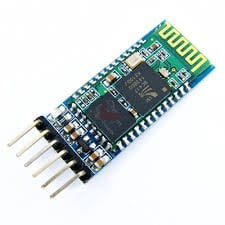
HC-05 is a Bluetooth device used for wireless communication. It works on serial communication (USART).
- It is a 6 pin module.
- The device can be used in 2 modes; data mode and command mode.
- The data mode is used for data transfer between devices whereas command mode is used for changing the settings of the Bluetooth module.
- AT commands are required in command mode.
- The module works on 5V or 3.3V. It has an onboard 5V to 3.3V regulator.
As the HC-05 Bluetooth module has a 3.3 V level for RX/TX and the microcontroller can detect 3.3 V level, so, no need to shift the transmit level of the HC-05 module. But we need to shift the transmit voltage level from the microcontroller to RX of the HC-05 module.
For more information about the HC-05 Bluetooth module and how to use it, refer to the topic Bluetooth module HC-05 in the sensors and modules section.
For information on USART in AVR ATmega16/ATmega32 and how to use it, refer the topic on USART in AVR ATmega16/ATmega32 in the ATmega basics section.
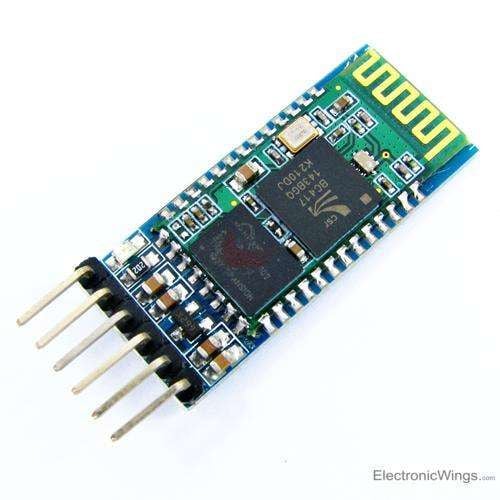
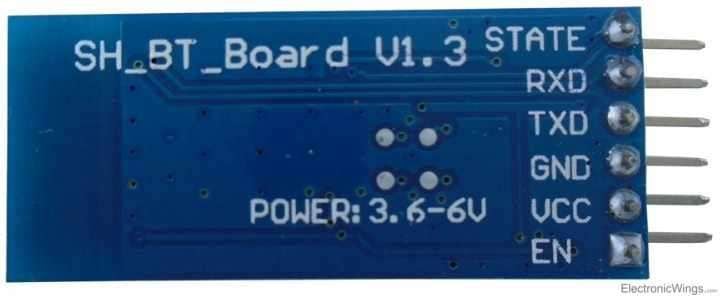
- Key: It is used to bring Bluetooth module in AT commands mode. If key pin is set to high, then this module will work in command mode. Otherwise by default it is in data mode. The default baud rate of HC-05 in command mode is 38400 bps.
- VCC: 5 V or 3.3 V.
- GND: Ground.
- TXD: Transmit Serial data (wirelessly received data by Bluetooth module transmitted out serially on TXD pin)
- RXD: Receive data serially (received data will be transmitted wirelessly by Bluetooth module).
- State: It tells that module is connected or not (here not used).
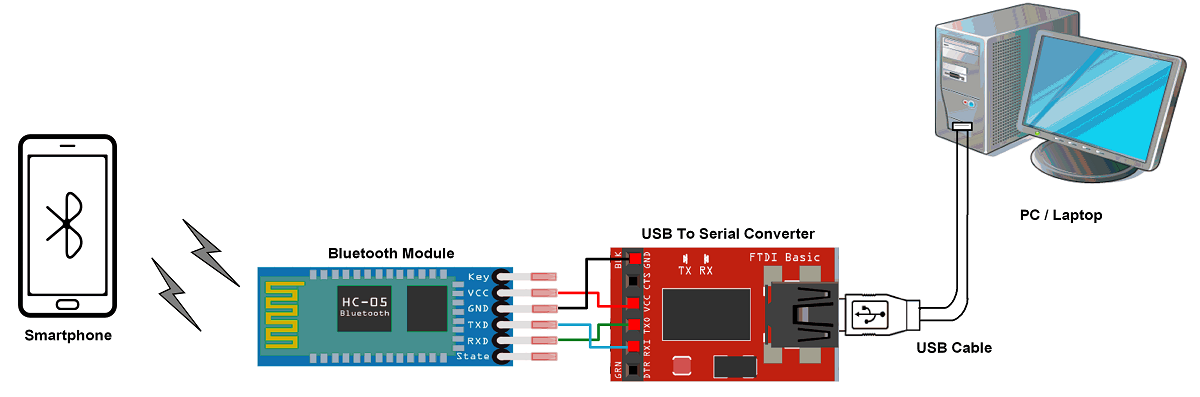
Following are some AT command generally used to change setting, customising of Bluetooth module.
To send these commands, we have to connect HC-05 Bluetooth module to the PC via serial to USB converter and transmit these commands through serial terminal of PC.
However, without changing any settings, we can also use bluetooth module HC-05 with it's default settings.
| Command | Description | Response |
| AT | Checking communication | OK |
| AT+PSWD=XXXX | Set Password e.g. AT+PSWD=4567 | OK |
| AT+NAME=XXXX | Set Bluetooth Device Name e.g. AT+NAME=MyHC-05 | OK |
| AT+UART=Baud rate, stop bit, parity bit | Change Baud rate e.g. AT+UART=9600,1,0 | OK |
| AT+VERSION? | Respond version no. of Bluetooth module | +Version: XX OK e.g. +Version: 2.0 20130107 OK |
| AT+ORGL | Send detail of setting done by manufacturer | Parameters: device type, module mode, serial parameter, passkey, etc. |
Connection Diagram of HC-05 Bluetooth Module With ATmega16/32
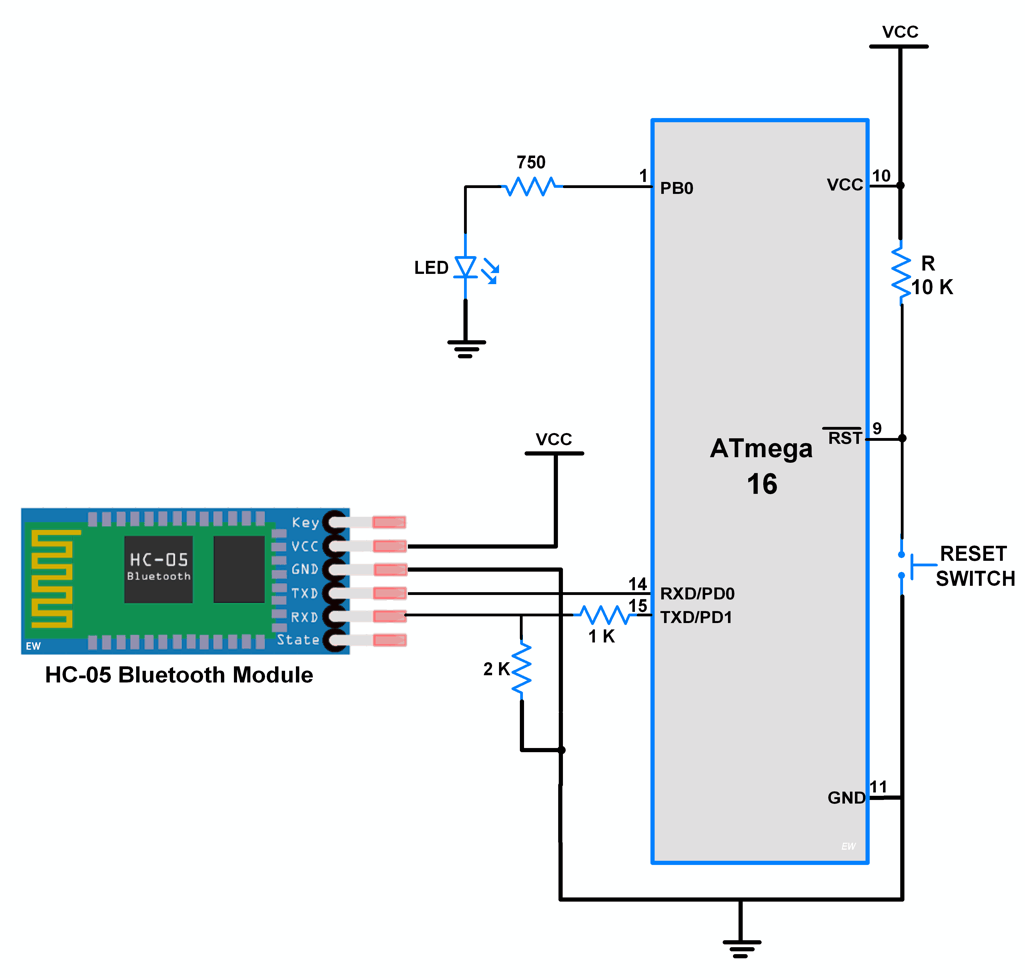
Controle the LED using HC-05 Bluetooth and ATmega16/32
Here let’s develop a small application in which we can control LED ON-OFF through a smartphone.
This is done by interfacing AVR-based ATmega16/ATmega32 with the HC-05 Bluetooth module. Data from HC-05 is received/ transmitted serially by ATmega16/32.
In this application, when 1 is sent from the smartphone, LED will Turn ON and if 2 is sent LED will get Turned OFF. If received data is other than 1 or 2, it will return a message to mobile that select the proper option.
Programming steps
- Initialize ATmega16/ATmega32 USART communication.
- Receive data from the HC-05 Bluetooth module.
- Check whether it is ‘1’ or ‘2’ and take respective controlling action on the LED.
HC-05 Bluetooth Code for ATmega16/32
/*
   Bluetooth_Interface with ATmega16 to Control LED via smartphone
   http://www.electronicwings.com
 */

#include <avr/io.h>
#include "USART_RS232_H_file.h"	/* include USART library */

#define LED PORTB		/* connected LED on PORT pin */

int main(void)
{
	char Data_in;
	DDRB = 0xff;		/* make PORT as output port */
	USART_Init(9600);	/* initialize USART with 9600 baud rate */
	LED = 0;

	while(1)
	{
		Data_in = USART_RxChar();	/* receive data from Bluetooth device*/
		if(Data_in =='1')
		{
			LED |= (1<<PB0);	/* Turn ON LED */
			USART_SendString("LED_ON");/* send status of LED i.e. LED ON */

		}
		else if(Data_in =='2')
		{
			LED &= ~(1<<PB0);	/* Turn OFF LED */
			USART_SendString("LED_OFF"); /* send status of LED i.e. LED OFF */
		}
		else
			USART_SendString("Select proper option"); /* send message for selecting proper option */
	}
}
Video of Bluetooth Communication using ATmega16
Components Used
Powered by
Bluetooth is a wireless communication protocol used to communicate over short distances. It is used for low power, low cost wireless data transmission applications over 2.4 – 2.485 GHz (unlicensed) frequency band.
713-113020008
Downloads
Comments28
Join the discussion — share a question or tip.
- SA
Hi Is it possible to make this module command only from a specific mobile phone?
- JO
Hello, i have connected everthing to plan and i also used the same bluetooth terminal application on my smartphone. When i send 1,2 i get ??? on the terminal app.... I really need it for my project. Do you know what could be the reason? My Controller is also Atmega32/16 Also the LED doesnt light up when i send 1 through bluetooth
- SA
please send your code and schematic
- TH
Anyone working with HC-12 serial communication module between two ATmega32A?
- RU
how to send data from microcontroller to bluetooth device
- MO
hi how can use delay and can I change the number 1 to A for on the led
- LO
Though you are sending string but UART will transmit it character by character. You can receive each character and store them into the array for comparison. Once you received your desired string, you can compare the string and take control action. Ex. int i=0; char data_in[size]; char received_char; while(1){ while((received_char = USART_RxChar()) ! = '\0')){ data_in[i] = received_char; i++; } data_in[i] = '\0'; // adding null as last element in the array //{now compare your string with array element } } I have not tested it but you can write logic like this.
- PA
We can get it here, https://www.youtube.com/watch?v=mCVtozmq3_0
- OLolcaycaliskan· edited
program is running . but how can we read the analog value ? example : int deneme = 50; deneme ??
- MO
hi bro... I write the code and no errors show and the program on phone is connected to hc05 but no action happens when running the code !!
- MA
SAme problem is occurring, the connection are okay but the commands are not properly working. it shows "??????", please help
- SA
hi I need to connect two HC-05 to communicate with each other, how do i do that? which one must be a master and which must be a slave? Thanks in advance
- LO
You can use any one HC-05 Bluetooth as a master and another one will be a slave. Just you have to configure them as master/slave using AT commands. For establishing communication between two HC-05 Bluetooth, you need AT command to connect them. This can be done by sending AT command to the slave device from controller. After establishing a connection between them, you can transfer communicate data between master and slave.
- HUhusainwamique· edited
Sir for this one only....... can you give me the codes for cv avr as this one seems for arduino
- SA
Shows ? in the bluetooth terminal Code didn't work.