HC-05 Bluetooth Module Interfacing with PIC18F4550
Bluetooth is a wireless communication protocol used to communicate over short distances. Here we design a smartphone-controlled LED using the HC-05 Bluetooth module.
Overview of Bluetooth
- HC-05 is a Bluetooth device used for wireless communication. It works on serial communication (USART).
- It is a 6-pin module.
- The device can be used in 2 modes; data mode and command mode.
- The data mode is used for data transfer between devices whereas command mode is used for changing the settings of the Bluetooth module.
- AT commands are required in command mode.
- The module works on 5V or 3.3V. It has an onboard 5V to 3.3V regulator.
- As the HC-05 Bluetooth module has a 3.3V level for RX/TX and the microcontroller can detect 3.3V level, so, no need to shift the transmit level of the HC-05 module. But we need to shift the transmit voltage level from the microcontroller to RX of the HC-05 module.
For more information about the HC-05 Bluetooth module and how to use it, refer to the topic Bluetooth module HC-05 in the sensors and modules section.
For information on USART in PIC18F4550 and how to use it, refer to the topic on USART in PIC18F4550 in the PIC inside section.
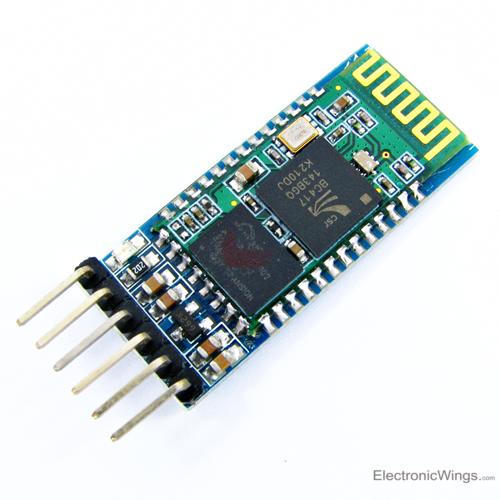
Connection Diagram of Bluetooth Module HC-05 to PIC18F4550
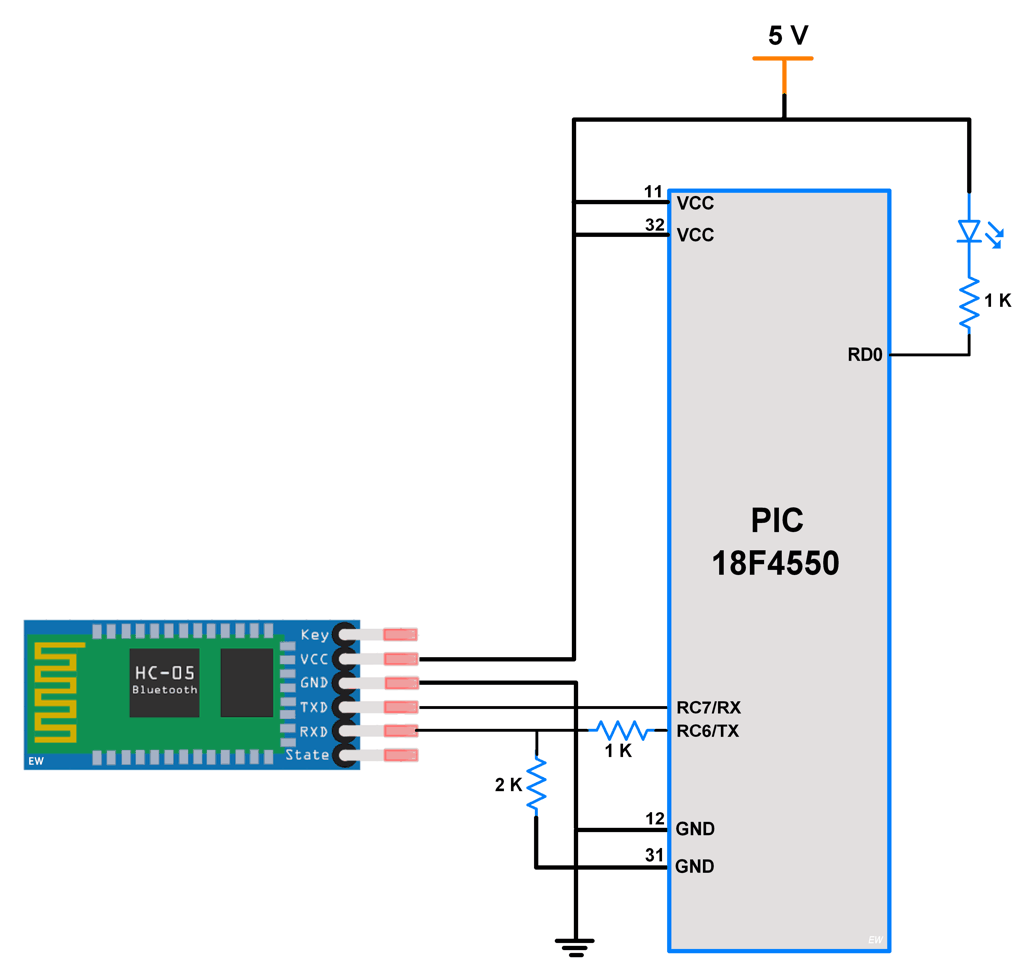
Control the LED using HC-05 Bluetooth Module and PIC18F4550
Here let’s develop a small application in which we can control LED ON-OFF through a smartphone.
This is done by interfacing PIC18F4550 with the HC-05 Bluetooth module. Data from HC-05 is received/ transmitted serially by PIC18F.
In this application, when 1 is sent from the smartphone, LED will turn ON and if 2 is sent LED will get Turned OFF. If received data is other than 1 or 2, it will return a message to mobile that select the proper option.
Programming HC-05
- Initialize PIC18F4550 USART communication.
- Receive data from the HC-05 Bluetooth module.
- Check whether it is ‘1’ or ‘2’ and take respective controlling action on the LED.
HC-05 Bluetooth Module Code for PIC18F4550
/* Interface HC-05 Bluetooth module with PIC18F4550
 * http://www.electronicwings.com
 */

#include <pic18f4550.h>
#include "Configuration_Header_File.h"
#include "USART_Header_File.h"

#define LED LATD0
void main()
{
    OSCCON=0x72;  /* use internal oscillator frequency
                                 which is set to 8 MHz */
    char data_in;
    TRISD = 0;  /* set PORT as output port */
    USART_Init(9600);  /* initialize USART operation with 9600 baud rate */
    MSdelay(50);
    while(1)
    {
        data_in=USART_ReceiveChar();
        if(data_in=='1')
        {
            LED = 0;  /* turn ON LED */
            USART_SendString("LED_ON");  /* send LED ON status to terminal */
        }
        else if(data_in=='2')

        {
            LED = 1;  /* turn OFF LED */
            USART_SendString("LED_OFF");  /* send LED OFF status to terminal */
        }
        else
        {
            USART_SendString(" select 1 or 2");  /* send msg to select proper option */
        }
        MSdelay(100);
    }
}
Video of LED ON and OFF using HC-05 Bluetooth and PIC18F4550
Components Used
Powered by
Bluetooth is a wireless communication protocol used to communicate over short distances. It is used for low power, low cost wireless data transmission applications over 2.4 – 2.485 GHz (unlicensed) frequency band.
713-113020008
Downloads
Comments19
Join the discussion — share a question or tip.
- DI
You are the goat, you save me so hard! Thank you
- JA
el modelo del USART con el servo en el PIC18F4550?
- WE
May i know what plugins is required pls?Thx
- ES
dear sir can i ask for hex file to be burned on pic 18f4550 thanks in advance essayed9@hotmail.com whats app 00201006273051
- DM
Germany: Danke, es funktioniert mit PIC16F1939 und HC-06 Bluetooth Module! Hab den Code ein bisschen umgeändert: Habe mein "config.h". Einstellungen im "USART_Header_File.h" sind fast identisch, außer "TRISCbits.TRISC6 = 0;" und im "main" > "#define LED PORTDbits.RD1".
- BL
USART_SendString() code? and why 1k and 2k resistor use in RX pin?
- BLblarblublublar· edited
USART_Init(9600); /* initialize USART operation with 9600 baud rate */ MSdelay(50); else { USART_SendString(" select 1 or 2"); /* send msg to select proper option */ } MSdelay(100); why delay 50ms and 100ms?
- KM
Hi, can I use PIC16F723A instead of PIC18F4550 ? Also do you have any tutorial on pic to pic Bluetooth tutorial. I want to send data using a microcontroller instead of phons
- LO
Not sure about pic16f723a. If their register are same then you can use. N if that is the case then use xc. h instead of pic18f4550. h For Pic to Pic Bluetooth communication, just make one Bluetooth master and other one should be slave. Connect them and then you can communicate serially as mentioned above.
- KE
Because the receiving character from bluetooth is to be nibble shifted.