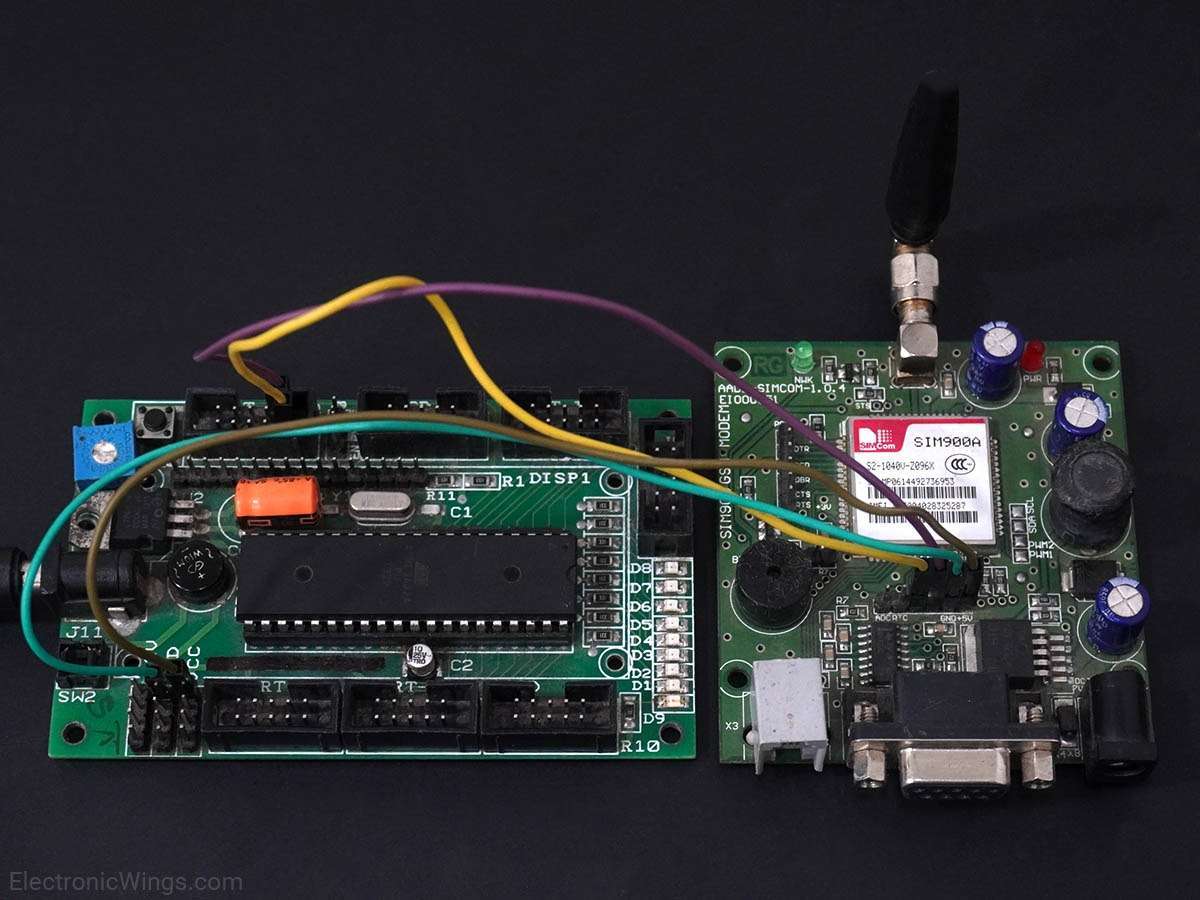
HTTP Client using SIM900A GPRS and PIC18F4550
Hypertext Transfer Protocol (HTTP) is a standard application layer protocol in between server and client. Using the SIM900A GPRS module, we can implement HTTP server/client over GPRS for IoT applications.
Introduction to HTTP
SIM900 enables GPRS for Embedded applications. We can implement HTTP Client protocol using the SIM900 HTTP function AT Commands.
The Hypertext Transfer Protocol (HTTP) is a standard application layer protocol that functions as a request-response protocol between server and client.
It is widely used in IoT (Internet of Things) based embedded applications, where every sensor is connected to a server and we have access to control them over the internet.
To know aboutSIM900 GSM/GPRS Module refer to SIM900
Connection Diagram SIM900 GSM Module With PIC18F4550
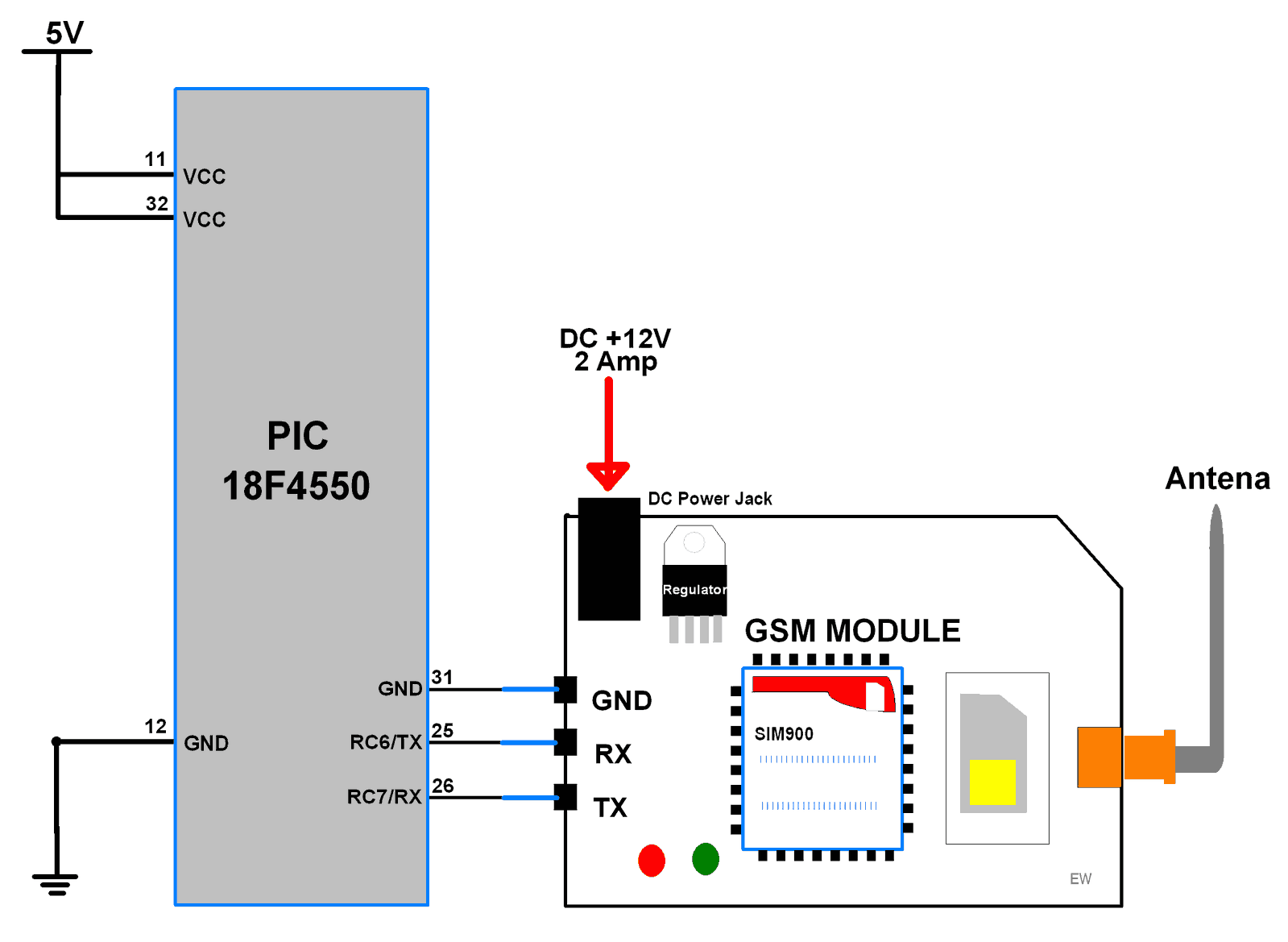
HTTP Client over GPRS
Let’s program PIC18F4550 to configure SIM900A as HTTP Client and GET/POST data from/to Server using GPRS.
Here, we are using the Thingspeak server for HTTP Client demo purposes.
Thingspeak is an open IoT platform where anyone can visualize and analyze live data from their sensor devices. Also, we can perform data analysis on data posted by remote devices with Matlab code in Thingspeak. To learn more about Thingspeak refer link
https://thingspeak.com/pages/learn_more
Just sign up and create a channel. We have below the channel and write key on Thingspeak for data send and receive.
- channel ID is = 119922
- Write Key is = C7JFHZY54GLCJY38
Note: Do not forget to tick the Make Public field in the channel setting option on your Thingspeak channel. It makes the channel available to use as public. This allows any user to access channel data without any username & password.
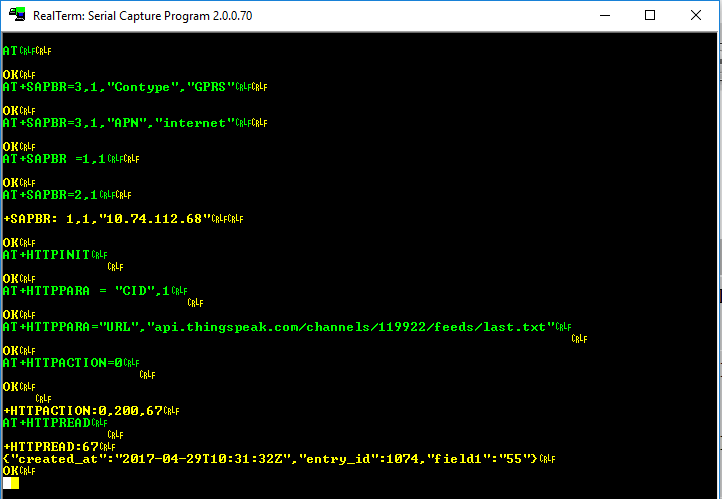
For HTTP GET method, use below AT command steps shown in the screenshot of RealTermSerial Terminal.
The below screenshot consists of AT commands (Green) and Responses (Yellow).
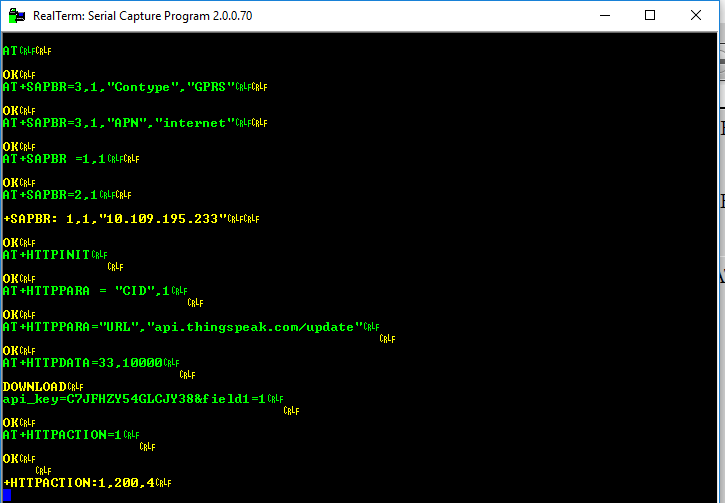
For the HTTP POST method, use below AT command steps shown in the screenshot of the RealTerm Serial Terminal.
In the below program of HTTP Client, do the following
For HTTP Client GET method
#define GET_DEMO					/* Define GET demo */
//#define POST_DEMO					/* Define POST demo */
For HTTP Client POST method
//#define GET_DEMO					/* Define GET demo */
#define POST_DEMO					/* Define POST demo */
Edit Fields below with respective data
/* Define Required fields shown below */
#define URL				"api.thingspeak.com/update"
#define API_WRITE_KEY	"your write key"
#define CHANNEL_ID		"your channel ID"
#define APN				"APN of your service provider"
#define USERNAME		"Username if any or left blank"
#define PASSWORD		"Password or left blank"
In the below program, we are using response-based functions to get a better status if things deviate from normal.
Program for HTTP Client with Thingspeak
/*
 * HTTP Client using GPRS & PIC
 * http://www.electronicwings.com
 */

#include <string.h>
#include <stdio.h>
#include <stdint.h>
#include <stdlib.h>
#include <stdbool.h>
#include <pic18f4550.h>
#include "USART_Header_File.h"
#include "Configuration_header_file.h"

#define DEFAULT_BUFFER_SIZE	200		/* Define default buffer size */
#define DEFAULT_TIMEOUT		20000		/* Define default timeout */
#define DEFAULT_CRLF_COUNT	2		/* Define default CRLF count */

#define POST			1		/* Define method */
#define GET			0

#define GET_DEMO				/* Define GET demo */
//#define POST_DEMO				/* Define POST demo */


/* Define Required fields shown below */
#define URL			"api.thingspeak.com/update"
#define API_WRITE_KEY		"C7JFHZY54GLCJY38"
#define CHANNEL_ID		"119922"
#define APN			"internet"
#define USERNAME		""
#define PASSWORD		""

enum SIM900_RESPONSE_STATUS			/* Enumerate response status */
{
	SIM900_RESPONSE_WAITING,
	SIM900_RESPONSE_FINISHED,
	SIM900_RESPONSE_TIMEOUT,
	SIM900_RESPONSE_BUFFER_FULL,
	SIM900_RESPONSE_STARTING,
	SIM900_RESPONSE_ERROR
};

int8_t Response_Status, CRLF_COUNT = 0;
uint16_t Counter = 0;
uint32_t TimeOut = 0;
char RESPONSE_BUFFER[DEFAULT_BUFFER_SIZE];

void MSdelay(unsigned int val)
{
     unsigned int i,j;
        for(i = 0; i <= val; i++)
            for(j = 0; j < 165; j++);		/* 1 ms delay for 8MHz Frequency */
}

void Read_Response()
{
  char CRLF_BUF[2];
  char CRLF_FOUND;
  uint32_t TimeCount = 0, ResponseBufferLength;
  while(1)
  {
      if(TimeCount>= (DEFAULT_TIMEOUT+TimeOut))
    {
	CRLF_COUNT = 0; TimeOut = 0;
	Response_Status = SIM900_RESPONSE_TIMEOUT;
	return;
    }
    if(Response_Status == SIM900_RESPONSE_STARTING)
    {
	CRLF_FOUND = 0;
	memset(CRLF_BUF, 0, 2);
	Response_Status = SIM900_RESPONSE_WAITING;
    }
    ResponseBufferLength = strlen(RESPONSE_BUFFER);
    if (ResponseBufferLength)
    {
	MSdelay(1);
	TimeCount++;
	if (ResponseBufferLength==strlen(RESPONSE_BUFFER))
	{
	    for (uint16_t i=0;i<ResponseBufferLength;i++)
		{
		   memmove(CRLF_BUF, CRLF_BUF + 1, 1);
		   CRLF_BUF[1] = RESPONSE_BUFFER[i];
		   if(!strncmp(CRLF_BUF, "\r\n", 2))
		    {
			if(++CRLF_FOUND == (DEFAULT_CRLF_COUNT+CRLF_COUNT))
			{
		          CRLF_COUNT = 0; TimeOut = 0;
			  Response_Status = SIM900_RESPONSE_FINISHED;
			  return;
			}
		    }
		}
	    CRLF_FOUND = 0;
	  }
      }
      MSdelay(1);
      TimeCount++;
   }
}

void Start_Read_Response()
{
	Response_Status = SIM900_RESPONSE_STARTING;
	do {
		Read_Response();
	} while(Response_Status == SIM900_RESPONSE_WAITING);
}

void Buffer_Flush()				/* Flush buffer */
{
	memset(RESPONSE_BUFFER, 0, DEFAULT_BUFFER_SIZE);
	Counter=0;
}

/* Remove CRLF and other default strings from response */
void GetResponseBody(char* Response, uint16_t ResponseLength)
{

	uint16_t i = 12;
	char buffer[5];
	while(Response[i] != '\r')
		++i;

	strncpy(buffer, Response + 12, (i - 12));
	ResponseLength = atoi(buffer);

	i += 2;
	uint16_t tmp = strlen(Response) - i;
	memcpy(Response, Response + i, tmp);

	if(!strncmp(Response + tmp - 6, "\r\nOK\r\n", 6))
	memset(Response + tmp - 6, 0, i + 6);
}

bool WaitForExpectedResponse(const char* ExpectedResponse)
{
	Buffer_Flush();
	MSdelay(200);
	Start_Read_Response();			/* First read response */
	if((Response_Status != SIM900_RESPONSE_TIMEOUT) &&
	(strstr(RESPONSE_BUFFER, ExpectedResponse) != NULL))
		return true;			/* Return true for success */
	return false;				/* Else return false */
}

bool SendATandExpectResponse(const char* ATCommand, const char* ExpectedResponse)
{
	USART_SendString(ATCommand);		/* Send AT command to SIM900 */
	USART_TxChar('\r');
	return WaitForExpectedResponse(ExpectedResponse);
}

bool HTTP_Parameter(const char* Parameter, const char* Value)
{
	USART_SendString("AT+HTTPPARA=\"");
	USART_SendString(Parameter);
	USART_SendString("\",\"");
	USART_SendString(Value);
	USART_SendString("\"\r");
	return WaitForExpectedResponse("OK");
}

bool SIM900HTTP_Start()				/* Check SIM900 board */
{
	for (uint8_t i=0;i<5;i++)
	{
		if(SendATandExpectResponse("ATE0","OK")||SendATandExpectResponse("AT","OK"))
		{
			HTTP_Parameter("CID","1");/* set Bearer profile identifier */
			return true;
		}
	}
	return false;
}

bool SIM900HTTP_Connect(const char* _APN, const char* _USERNAME, const char* _PASSWORD)
{

	USART_SendString("AT+CREG?\r");
	if(!WaitForExpectedResponse("+CREG: 0,1"))
		return false;

	USART_SendString("AT+SAPBR=0,1\r");
	WaitForExpectedResponse("OK");

	USART_SendString("AT+SAPBR=3,1,\"CONTYPE\",\"GPRS\"\r");
	WaitForExpectedResponse("OK");

	USART_SendString("AT+SAPBR=3,1,\"APN\",\"");
	USART_SendString(_APN);
	USART_SendString("\"\r");
	WaitForExpectedResponse("OK");

	USART_SendString("AT+SAPBR=3,1,\"USER\",\"");
	USART_SendString(_USERNAME);
	USART_SendString("\"\r");
	WaitForExpectedResponse("OK");

	USART_SendString("AT+SAPBR=3,1,\"PWD\",\"");
	USART_SendString(_PASSWORD);
	USART_SendString("\"\r");
	WaitForExpectedResponse("OK");

	USART_SendString("AT+SAPBR=1,1\r");
	return WaitForExpectedResponse("OK");
}

bool HTTP_Init()				/* Initiate HTTP */
{
	USART_SendString("AT+HTTPINIT\r");
	return WaitForExpectedResponse("OK");
}

bool HTTP_Terminate()				/* terminate HTTP */
{
	USART_SendString("AT+HTTPTERM\r");
	return WaitForExpectedResponse("OK");
}

bool HTTP_SetURL(char * url)			/* Set URL */
{
	return HTTP_Parameter("URL", url);
}

bool HTTP_Connected()				/* Check for connected */
{
	USART_SendString("AT+SAPBR=2,1\r");
	CRLF_COUNT = 2;										/* Make additional crlf count for response */
	return WaitForExpectedResponse("+SAPBR: 1,1");
}

bool HTTP_SetPost_json()			/* Set Json Application format for post */
{
	return HTTP_Parameter("CONTENT", "application/json");
}

bool HTTP_Save()				/* Save the application context */
{
	USART_SendString("AT+HTTPSCONT\r");
	return WaitForExpectedResponse("OK");
}

bool HTTP_Data(char* data)			/* Load HTTP data */
{
	char _buffer[25];
	sprintf(_buffer, "AT+HTTPDATA=%d,%d\r", strlen(data), 10000);
	USART_SendString(_buffer);

	if(WaitForExpectedResponse("DOWNLOAD"))
		return SendATandExpectResponse(data, "OK");
	else
		return false;
}

bool HTTP_Action(char method)			/* Select HTTP Action */
{
	if(method == GET)
		USART_SendString("AT+HTTPACTION=0\r");
	if(method == POST)
		USART_SendString("AT+HTTPACTION=1\r");

	return WaitForExpectedResponse("OK");
}

bool HTTP_Read(uint8_t StartByte, uint16_t ByteSize) /* Read HTTP response */
{
	char Command[25];
	sprintf(Command,"AT+HTTPREAD=%d,%d\r",StartByte,ByteSize);
	Command[24] = 0;
	USART_SendString(Command);

	CRLF_COUNT = 2;										/* Make additional crlf count for response */
	if(WaitForExpectedResponse("+HTTPREAD"))
	{
		GetResponseBody(RESPONSE_BUFFER, ByteSize);
		return true;
	}
	else
		return false;
}

uint8_t HTTP_Post(char* Parameters, uint16_t ResponseLength)
{
	HTTP_Parameter("CID","1");		/* set Bearer profile identifier */
	if(!(HTTP_Data(Parameters) && HTTP_Action(POST)))
	return SIM900_RESPONSE_TIMEOUT;

	bool status200 = WaitForExpectedResponse(",200,");

	if(Response_Status == SIM900_RESPONSE_TIMEOUT)
	return SIM900_RESPONSE_TIMEOUT;
	if(!status200)
	return SIM900_RESPONSE_ERROR;

	HTTP_Read(0, ResponseLength);
	return SIM900_RESPONSE_FINISHED;
}

uint8_t HTTP_get(char * _URL, uint16_t ResponseLength)
{
	HTTP_Parameter("CID","1");		/* set Bearer profile identifier */
	HTTP_Parameter("URL", _URL);
	HTTP_Action(GET);
	WaitForExpectedResponse("+HTTPACTION:0,");
	if(Response_Status == SIM900_RESPONSE_TIMEOUT)
	return SIM900_RESPONSE_TIMEOUT;

	HTTP_Read(0, ResponseLength);
	return SIM900_RESPONSE_FINISHED;
}

bool SIM900HTTP_Init()
{
	HTTP_Terminate();
	return HTTP_Init();
}

void interrupt ISR()				/* Receive ISR routine */
{
    uint8_t oldstatus = STATUS;
    INTCONbits.GIE = 0;
    char received_char;
    if(RCIF==1){
        RESPONSE_BUFFER[Counter] = RCREG;	/* Copy data to buffer & increment counter */
        Counter++;
        if(RCSTAbits.OERR)	/* check if any overrun occur due to continuous reception */
        {
            CREN = 0;
            NOP();
            CREN = 1;
        }
    }
    INTCONbits.GIE = 1;
    STATUS = oldstatus;
}

void main(void)
{
	char _buffer[100];

	#ifdef POST_DEMO
	uint8_t Sample = 0;
	#endif

	OSCCON = 0x72;				/* Set internal clock to 8MHz */
	USART_Init(9600);			/* Initiate USART with 9600 baud rate */
	INTCONbits.GIE=1;			/* enable Global Interrupt */
	INTCONbits.PEIE=1;			/* enable Peripheral Interrupt */
	PIE1bits.RCIE=1;			/* enable Receive Interrupt */

	while(!SIM900HTTP_Start());
	while(!(SIM900HTTP_Connect(APN, USERNAME, PASSWORD)));
	SIM900HTTP_Init();

	while(1)
	{
		if (!HTTP_Connected()) /* Check whether GPRS connected */
		{
		  SIM900HTTP_Connect(APN, USERNAME, PASSWORD);
		  SIM900HTTP_Init();
		}

		/* Take local buffer to copy response from server */
		uint16_t responseLength = 100;

		#ifdef POST_DEMO	/* POST Sample data on server */
		memset(_buffer, 0, 100);
		HTTP_SetURL(URL); HTTP_Save();
		sprintf(_buffer, "api_key=%s&field1=%d", API_WRITE_KEY, Sample++);
		HTTP_Post(_buffer, responseLength);
		MSdelay(15000);	/* Thingspeak server delay */
		#endif

		#ifdef GET_DEMO	/* GET last sample data from server */
		memset(_buffer, 0, 100);
		sprintf(_buffer, "api.thingspeak.com/channels/%s/feeds/last.txt", CHANNEL_ID);
		HTTP_get(_buffer, responseLength);
		#endif
	}
}
SIM900 Response
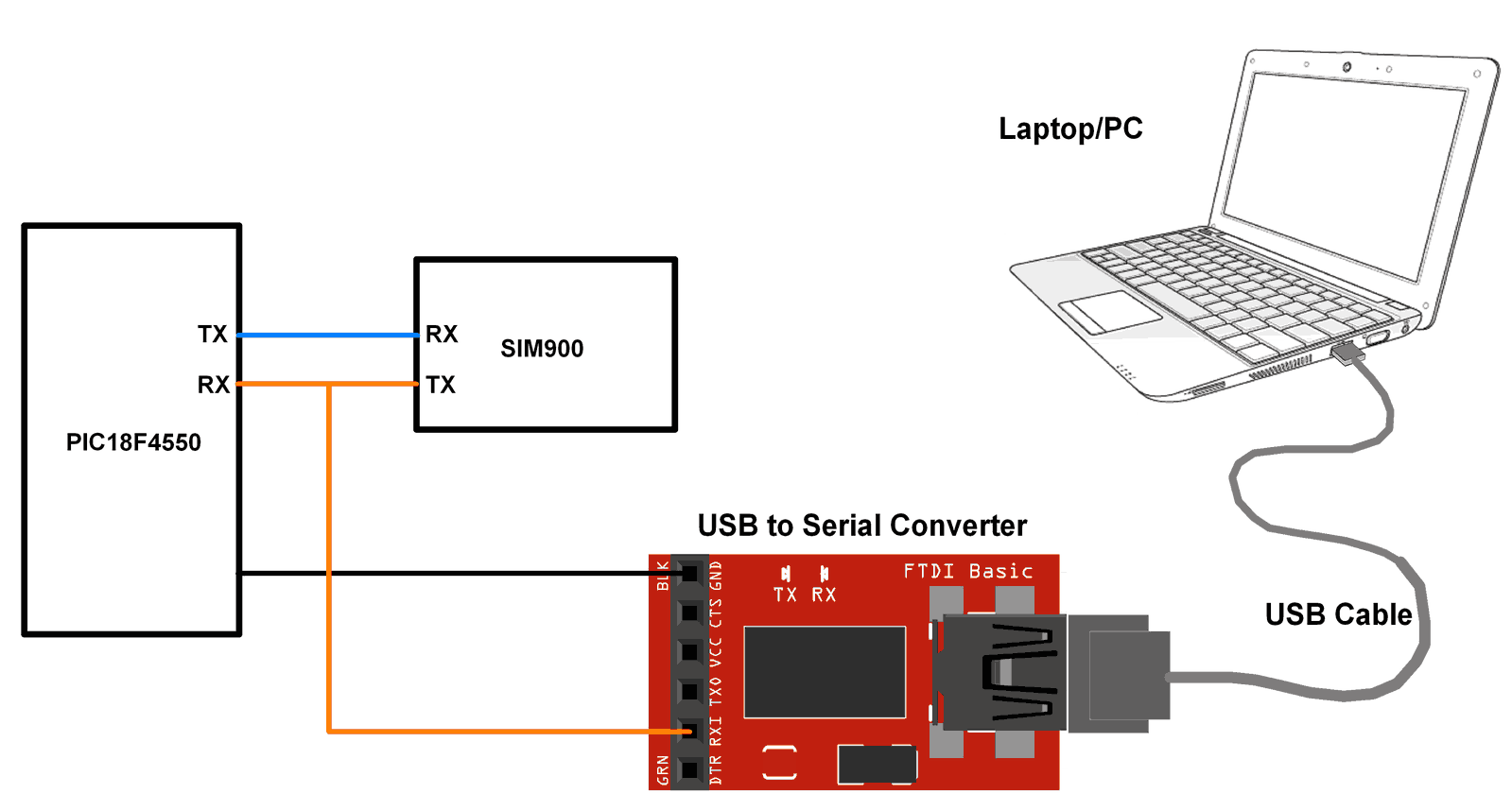
At the client end, we need to check SIM900 responses. We can check it on the serial terminal of the PC/Laptop. Connect SIM900 transmit pin (TX) to the receive pin (RX) of PIC18F4550 Microcontroller and to the receive pin (RX) of USB to serial converter as shown in the below figure. connect USB to serial converter to PC/Laptop. Open the serial terminal on the PC/Laptop to see the SIM900 responses for the AT command sent from PIC microcontroller.
Now for HTTP POST commands (sent from PIC Microcontroller), we can see the below response from SIM900 on the serial terminal for the Thingspeak server.
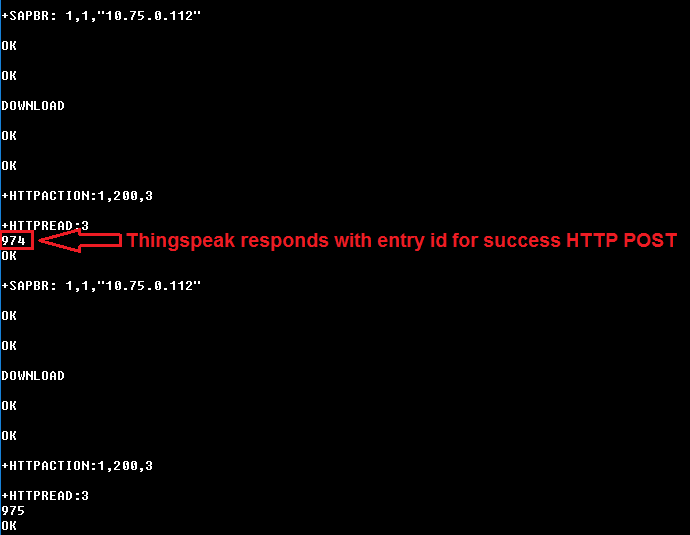
In response to HTTP POST, we get the data entry no. as shown in the above figure i.e. 974, 975, and so on.
For HTTP GET commands (sent from PIC Microcontroller), we can see the below response from SIM900 on the serial terminal for the Thingspeak server.
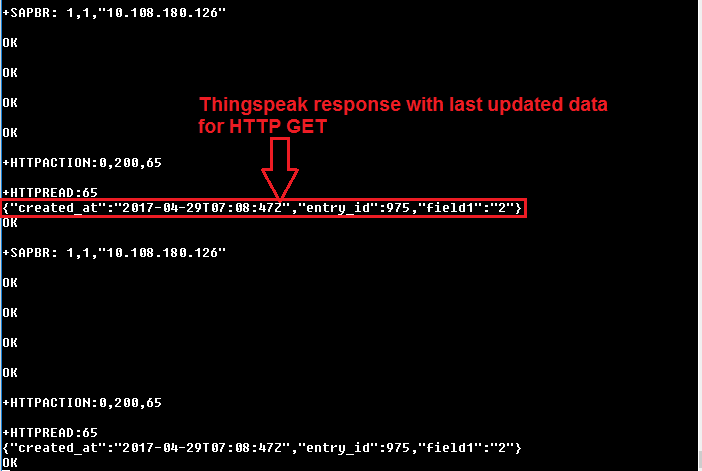
In response to HTTP GET, we get the last entry data for field1 on Thingspeak as shown in the above figure.
Note: here we are retrieving the last entry data on field1 of Thingspeak server hence we get the last updated data of field1 from the server as shown in the above figure i.e. “field1”:”2”. In the program, we used "api.thingspeak.com/channels/119922/feeds/last.txt" to receive the last updated data only.
Updates at Thingspeak server on HTTP POST
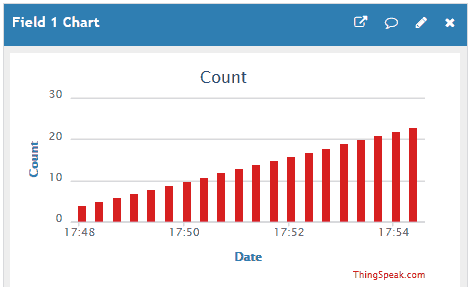
For HTTP POST, we can see the output at the server end. Here we are using the Thingspeak server and sending the incremented count at field1 on the server. We get incremented count at field1 of Thingspeak server as shown in the below figure.
Components Used
Powered by

SIM900A is dual band GSM/GPRS 900/1800MHz module board used to utilize GSM and GPRS services around the globe. It is used to make/receive voice calls, send/receive text messages, connect to and access the internet over GPRS.
170-M031-D
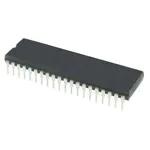
Downloads
Comments13
Join the discussion — share a question or tip.
- DA
Hello, can you explain when using GET method, where does the value go so that i can assign it to a variable? thanks
- OL
Hi, SIM900A module needs a SIM card to operate and dial a receiver. I can't see any dial commands ? How does this work or am I missing something ? I have used SIM800,808 and 900A to send and receive sensordata as SMS and this works different.
- OL
Replying to @lokeshc
Thanks. But were is the Internet connection taking place ? From my 900A module to internet via a channel ? How can you access the channel from your 900A to internet without any registration or dialup costs ?
- LOlokeshc· edited
Replying to @oladunk321
Hi, Sim900 needs sim card for mobile network. Then recharge that sim card with whatever internet pack. Then via program you can connect to the Internet using access point setting. You can find this in the above program. Read the whole content carefully. Also refer the following content to get more idea about SIM 900 http://electronicwings.com/sensors-modules/sim900a-gsmgprs-module
- OL
Replying to @lokeshc
Thanks for the answer. Now it's clear for me. I was not aware that you can get sim card for mobile network only. Here we have prepaid low cost sim cards for speech + SMS. For data network I'll need a subscription with for example 1G/month quota minimum and then we are talking high cost. Will try this for learning purposes. Very smart solution for remote access to green houses,agriculture monitoring etc.
- CA
Buenas tardes, estoy trabajando con CCS, y pues no tengo estas librerias, me podrian hacer el favor de facilitarlas Muchas gracias. #include "USART_Header_File.h" #include "Configuration_header_file.h"
- AU
Hello camilo, i hope you doing well, but can i know are you using mplabx ide ? if yes then i think "Configuration_header_file.h" file can be created with mplabx ide with your custom configs. and "USART_Header_File.h" is just library used for serial communication, you will get it in source code attachment.
- CAcamilo19961211· edited
Replying to @authorized
Hola buenas tardes, Gracias por responder. No estoy utilizando mplabx ide, voy a instalarlo, y a reconocer como funciona porque no lo he utilizado, estaba utilizando CCS C Compiler, y pues la forma del codigo tiene cosas diferentes, podrias brindarme mas información sobre este tema al correo "lumonje12@gmail.com", este codigo esta escrito en que editor CCs, MikroC, XC8..? Te agradezco por el tiempo prestado.
- MA
Replying to @camilo19961211
This code is written in MPLABx IDE and compiled using XC8 compiler. You can refer this link "https://www.electronicwings.com/pic/getting-started-with-pic18f4550-and-mplabx-ide" to start with MPLABX IDE and XC8 compiler.
- CA
Replying to @mayuresh4007
hay un problema con la interrupcion externa PIC_GPRS_HTTPClient.c:321:6: error: variable has incomplete type 'void' void interrupt ISR() Me paso tambien con otro proyecto, saben de alguna solución?
- AU
Replying to @camilo19961211
i think you should refer example of "how to write interrupt routines in XC8" Link ==> http://microchipdeveloper.com/faq:31