HTTP Client using SIM900A GPRS and AVR ATmega16
Hypertext Transfer Protocol (HTTP) is a standard application layer protocol between server and client. Using the SIM900A GPRS module, we can implement HTTP server/client over GPRS for IoT applications.
Overview of HTTP
.jpg)
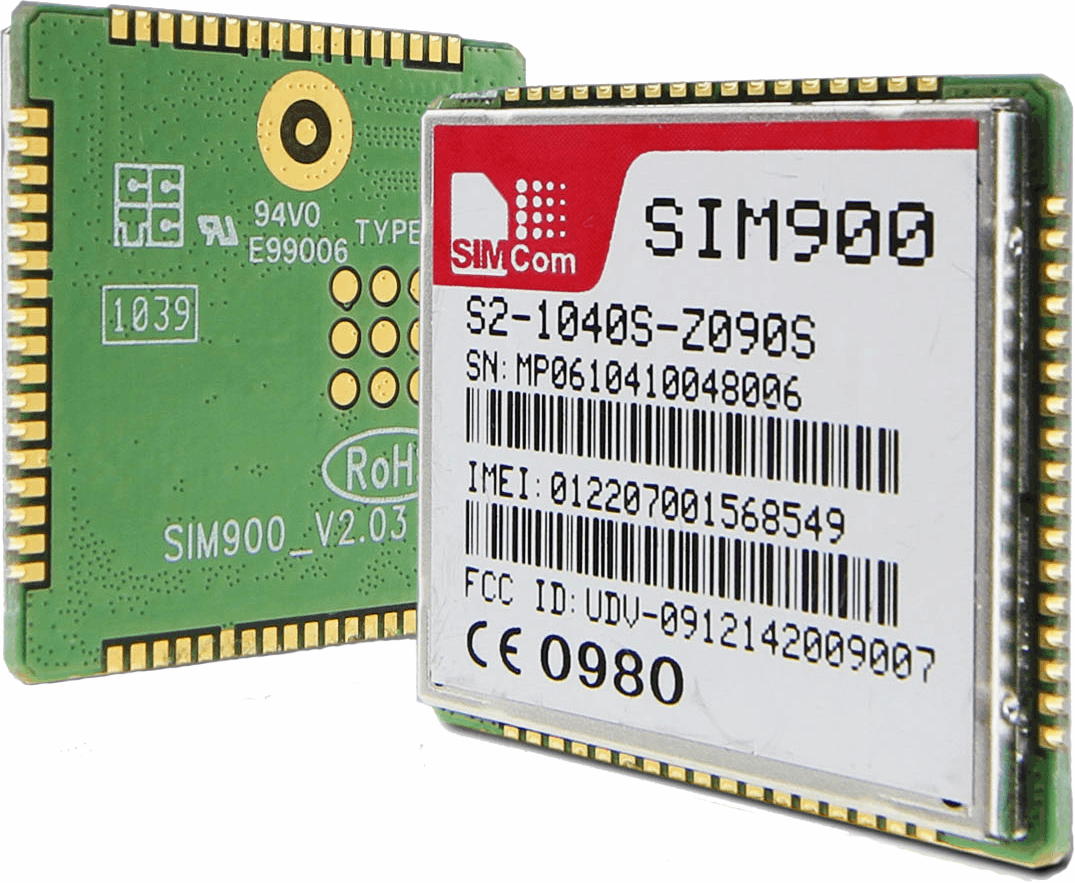
SIM900 enables GPRS to embedded applications. We can implement HTTP Client protocol using the SIM900 HTTP function AT Commands.
The Hypertext Transfer Protocol (HTTP) is a standard application layer protocol that functions as a request-response protocol between server and client.
It is widely used in IoT (Internet of Things) embedded applications, where every sensor is connected to a server and we have access to control them over the internet.
To know about SIM900 GSM/GPRS Module refer to SIM900
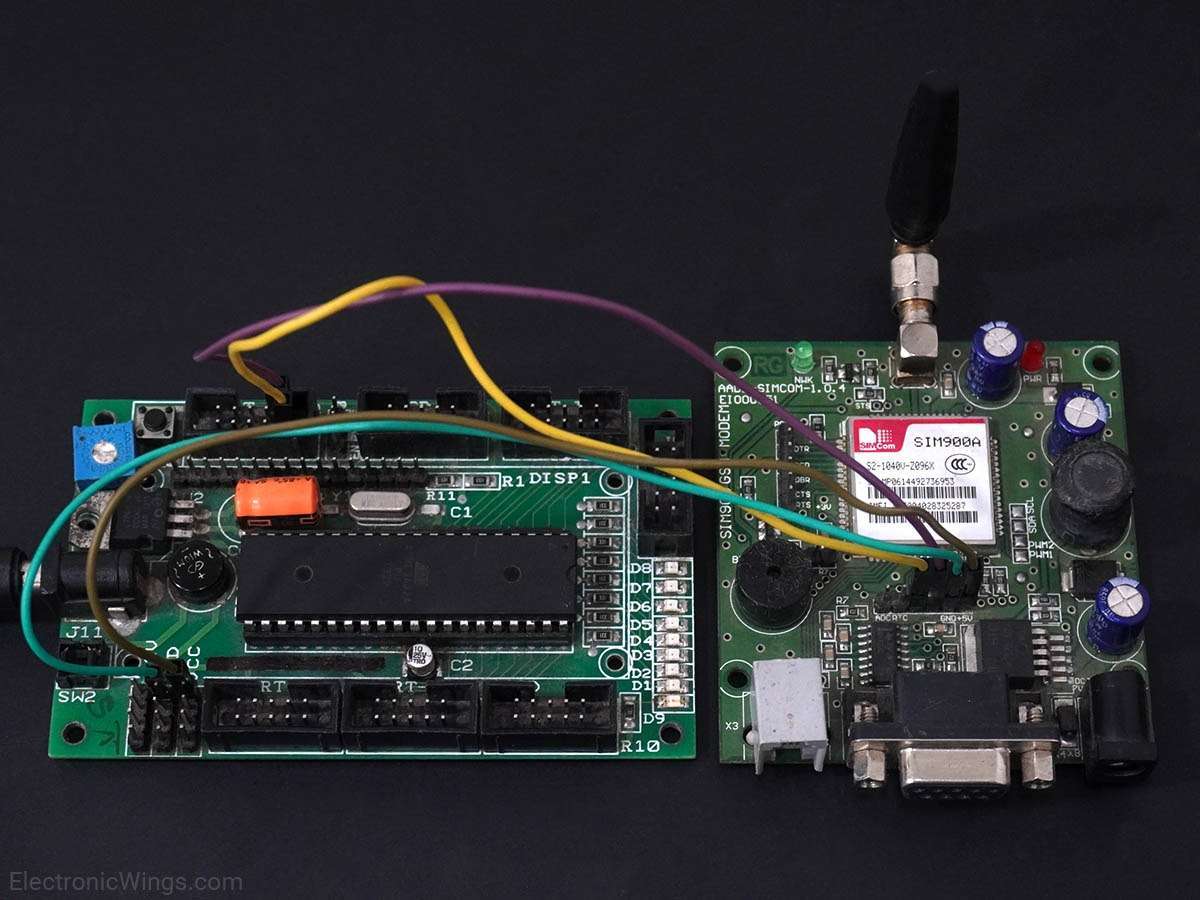
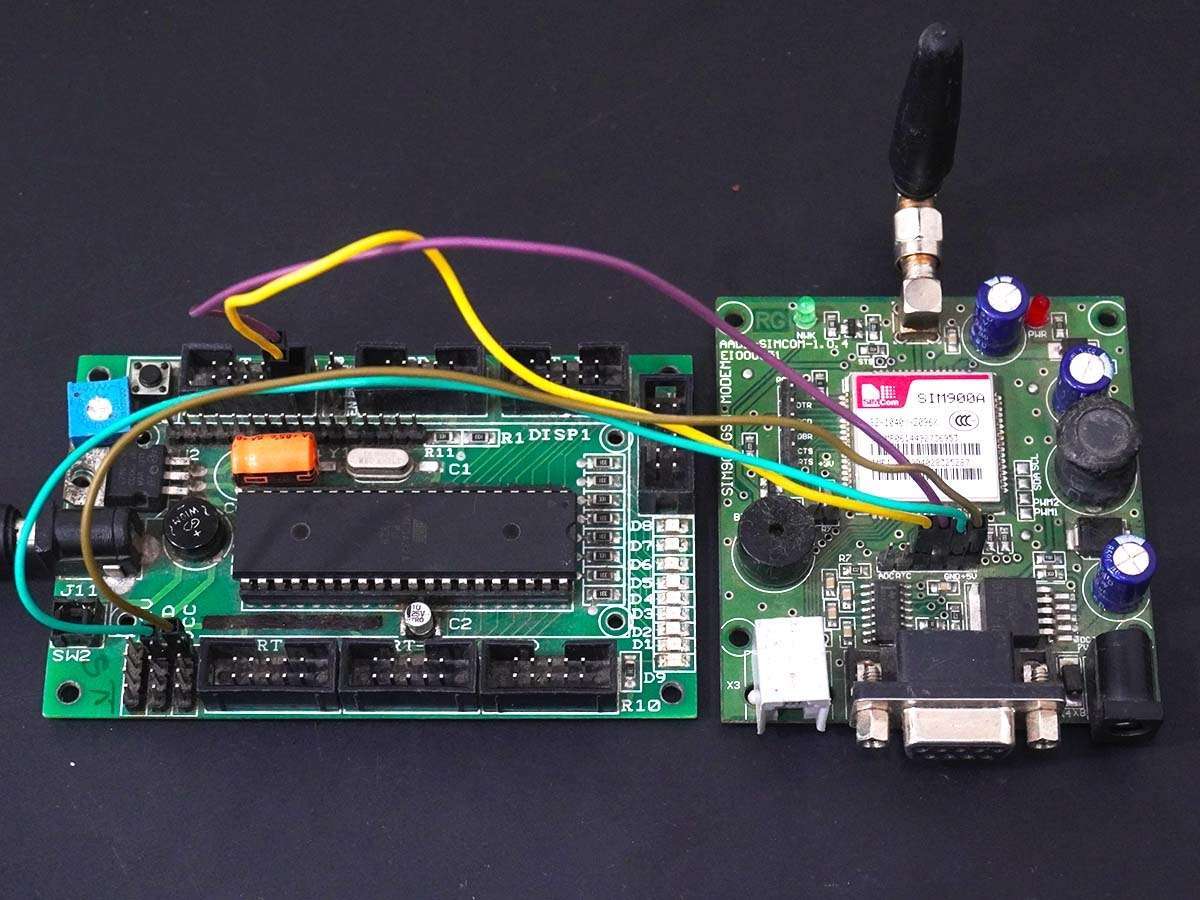
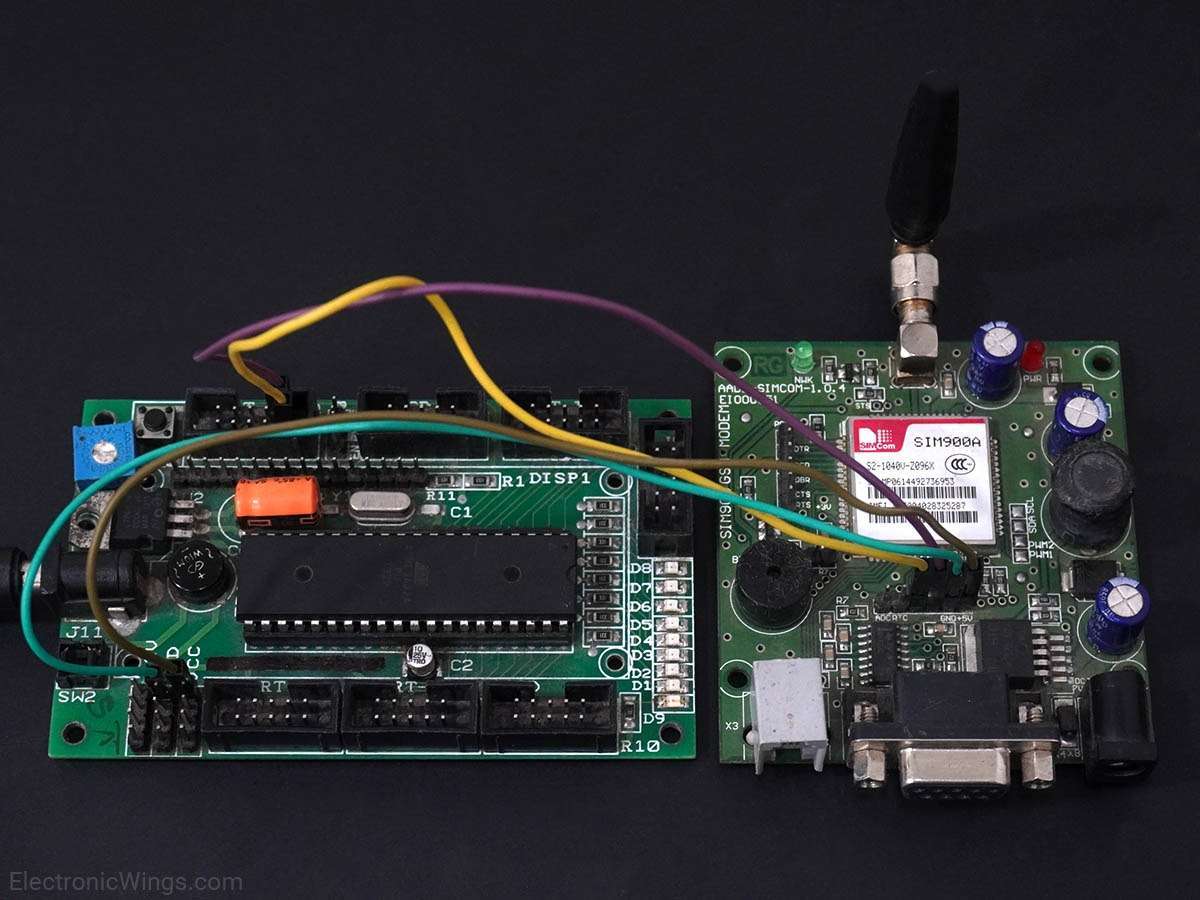
Connection Diagram of SIM900 with ATmega16/32
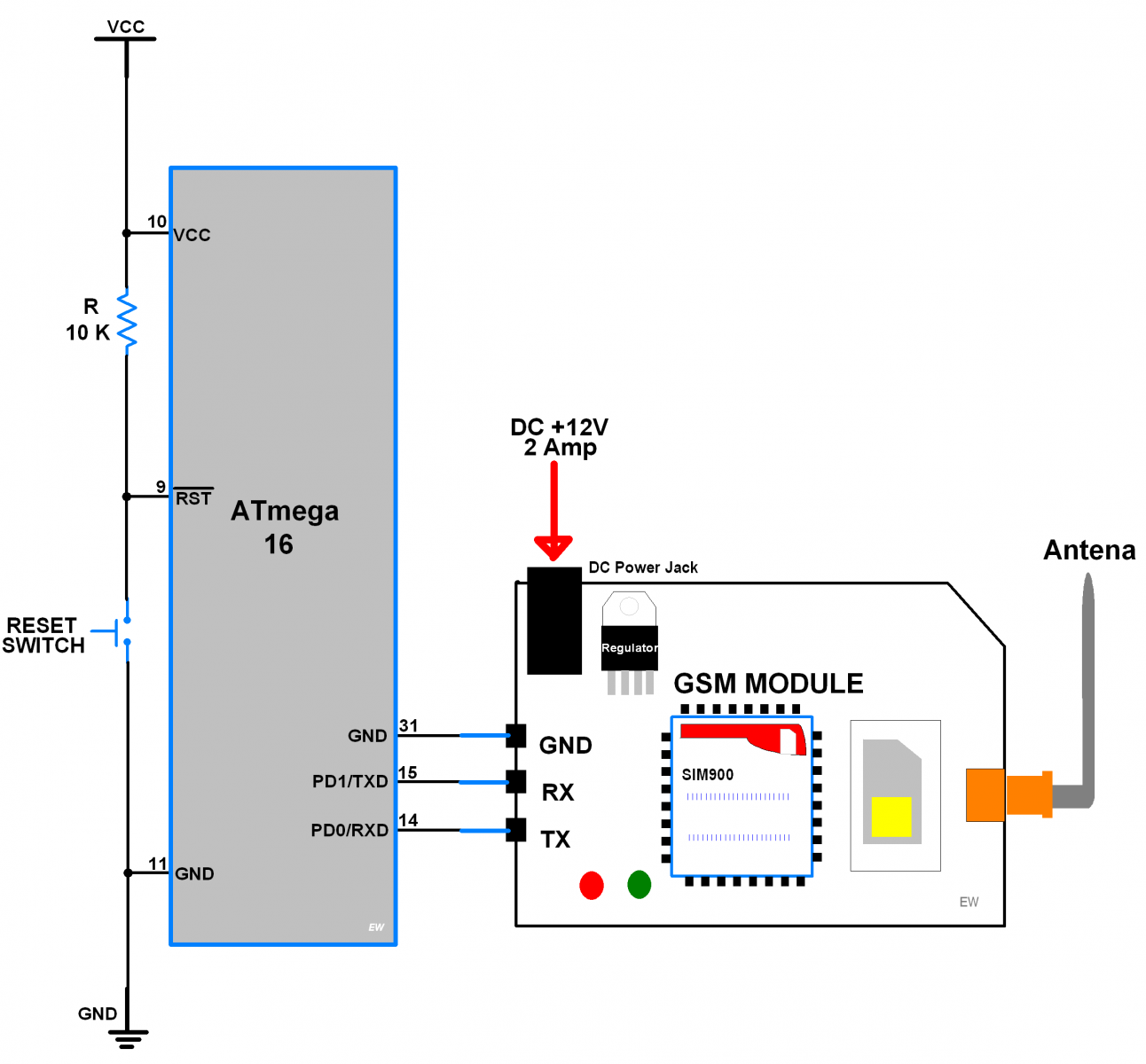
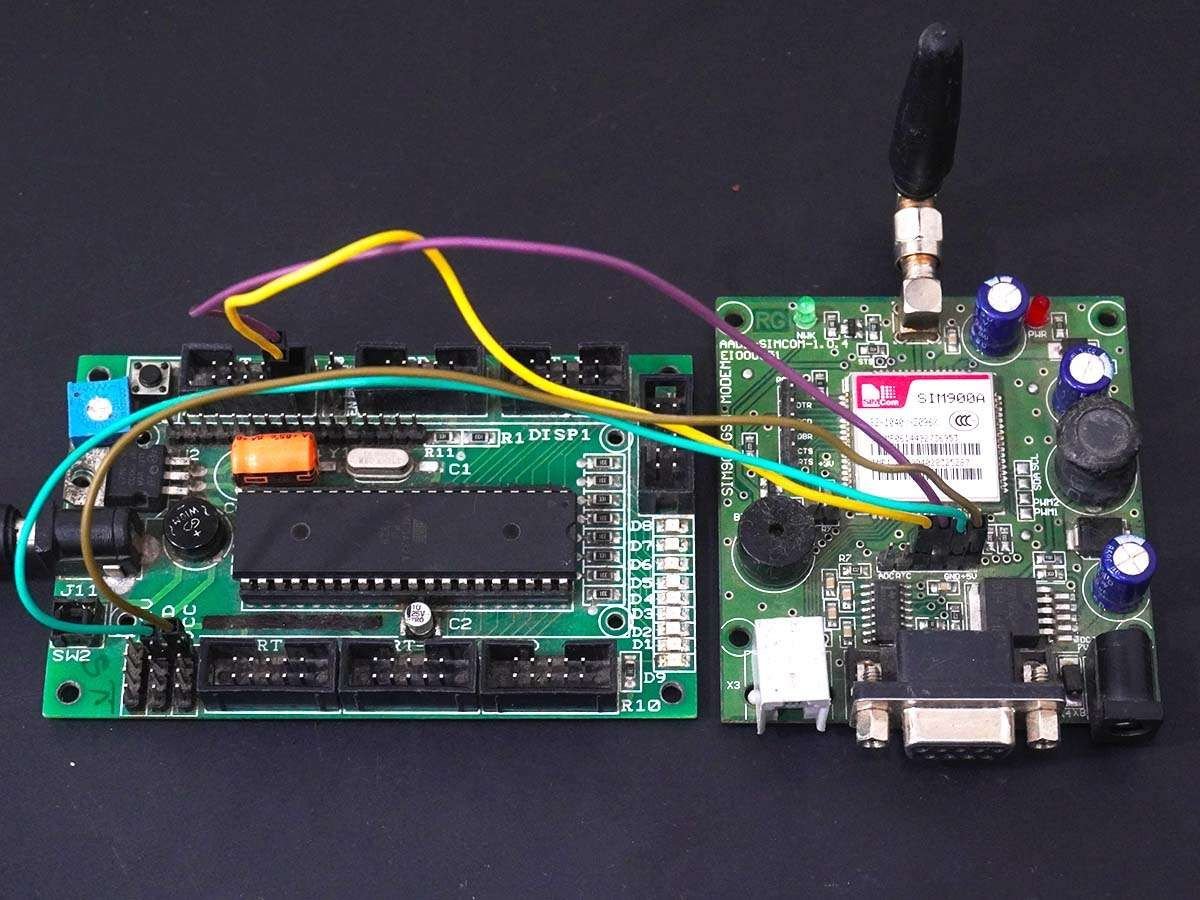
HTTP Client over GPRS
Let’s program AVR ATmega16 to configure SIM900A as HTTP Client and GET/POST data from/to Server using GPRS.
Here, we are using the Thingspeak server for HTTP Client demo purposes.
Thingspeak is an open IOT platform where anyone can visualize and analyze live data from their sensor devices. Also, we can perform data analysis on data posted by remote devices with Matlab code in Thingspeak. To learn more about Thingspeak refer link https://thingspeak.com/pages/learn_more
Just sign up and create a channel. We have below the channel and write key on Thingspeak for data send and receive.
- channel ID is = 119922
- Write Key is = C7JFHZY54GLCJY38
Note: Do not forget to tick the Make Public field in the channel setting option on your Thingspeak channel. It makes channels available to use as public. This allows any user to access channel data without any username & password.
For HTTP GET method, use below AT command steps shown in the screenshot of the RealTerm Serial Terminal.
The below screenshot consists of AT commands (Green) and Responses (Yellow).
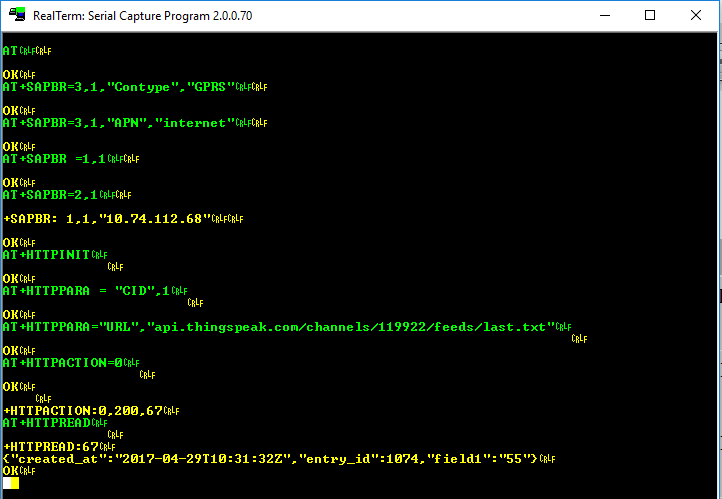
For the HTTP POST method, use below AT command steps shown in the screenshot of the RealTerm Serial Terminal.
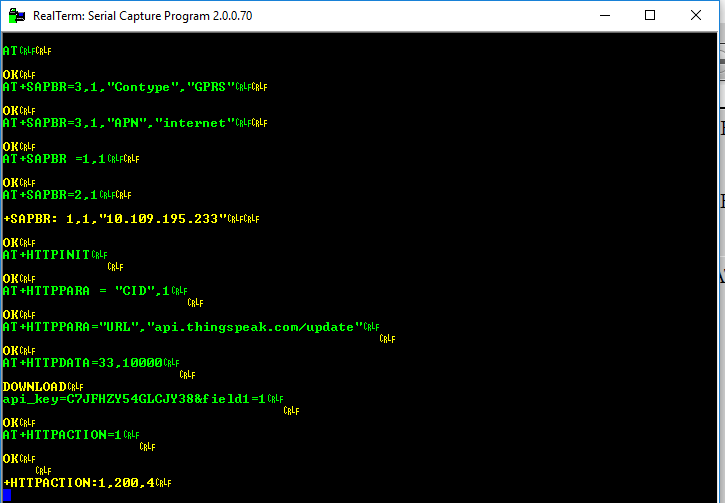
In the below program of HTTP Client, do the following
For HTTP Client GET method
#define GET_DEMO			/* Define GET demo */
//#define POST_DEMO			/* Define POST demo */
For HTTP Client POST method
//#define GET_DEMO			/* Define GET demo */
#define POST_DEMO			/* Define POST demo */
Edit Fields below with respective data
/* Define Required fields shown below */
#define URL					"api.thingspeak.com/update"
#define API_WRITE_KEY		"your write key"
#define CHANNEL_ID			"your channel ID"
#define APN					"APN of your service provider"
#define USERNAME			"Username if any or left blank"
#define PASSWORD			"Password or left blank"
In the below program, we are using response-based functions to get a better status if things deviate from normal.
Program for HTTP Client with Thingspeak
/*
 * ATmega16_GPRS_HTTPClient
 * http://www.electronicwings.com
 *
 */


#define F_CPU 8000000UL			/* Define CPU clock Frequency e.g. here its 8MHz */
#include <avr/io.h>			/* Include AVR std. library file */
#include <string.h>			/* Include string library */
#include <stdio.h>			/* Include standard IO library */
#include <stdlib.h>			/* Include standard library */
#include <stdbool.h>			/* Include standard boolean library */
#include <util/delay.h>			/* Include delay header file */
#include <avr/interrupt.h>		/* Include avr interrupt header file */
#include "USART_RS232_H_file.h"		/* Include USART header file */

#define SREG    _SFR_IO8(0x3F)

#define DEFAULT_BUFFER_SIZE	200	/* Define default buffer size */
#define DEFAULT_TIMEOUT		20000	/* Define default timeout */
#define DEFAULT_CRLF_COUNT	2	/* Define default CRLF count */

#define POST			1	/* Define method */
#define GET			0

/* Select Demo */
#define GET_DEMO			/* Define GET demo */
//#define POST_DEMO			/* Define POST demo */

/* Define Required fields shown below */
#define URL			"api.thingspeak.com/update"/* Server Name */
#define API_WRITE_KEY		"C7JFHZY54GLCJY38"/* Write key */
#define CHANNEL_ID		"119922"	/* Channel ID */
#define APN			"internet"	/* APN of GPRS n/w provider */
#define USERNAME		""
#define PASSWORD		""

enum SIM900_RESPONSE_STATUS		/* Enumerate response status */
{
	SIM900_RESPONSE_WAITING,
	SIM900_RESPONSE_FINISHED,
	SIM900_RESPONSE_TIMEOUT,
	SIM900_RESPONSE_BUFFER_FULL,
	SIM900_RESPONSE_STARTING,
	SIM900_RESPONSE_ERROR
};

char Response_Status, CRLF_COUNT = 0;
uint16_t Counter = 0;
uint32_t TimeOut = 0;
char RESPONSE_BUFFER[DEFAULT_BUFFER_SIZE];

void Read_Response()		/* Read response */
{
   static char CRLF_BUF[2];
   static char CRLF_FOUND;
   uint32_t TimeCount = 0, ResponseBufferLength;
   while(1)
   {
      if(TimeCount >= (DEFAULT_TIMEOUT+TimeOut))
	{
	   CRLF_COUNT = 0; TimeOut = 0;
	   Response_Status = SIM900_RESPONSE_TIMEOUT;
	   return;
	}

      if(Response_Status == SIM900_RESPONSE_STARTING)
	{
	   CRLF_FOUND = 0;
	   memset(CRLF_BUF, 0, 2);
	   Response_Status = SIM900_RESPONSE_WAITING;
	}
      ResponseBufferLength = strlen(RESPONSE_BUFFER);
      if (ResponseBufferLength)
	{
	   _delay_ms(1);
	   TimeCount++;
	   if (ResponseBufferLength==strlen(RESPONSE_BUFFER))
	      {
		for (uint16_t i=0;i<ResponseBufferLength;i++)
		{
		   memmove(CRLF_BUF, CRLF_BUF + 1, 1);
		   CRLF_BUF[1] = RESPONSE_BUFFER[i];
		   if(!strncmp(CRLF_BUF, "\r\n", 2))
		   {
		      if(++CRLF_FOUND == (DEFAULT_CRLF_COUNT+CRLF_COUNT))
			{
			   CRLF_COUNT = 0; TimeOut = 0;
			   Response_Status = SIM900_RESPONSE_FINISHED;
			   return;
			}
		   }
		}
	   CRLF_FOUND = 0;
	}
      }
      _delay_ms(1);
      TimeCount++;
   }
}

void Start_Read_Response()
{
	Response_Status = SIM900_RESPONSE_STARTING;
	do {
		Read_Response();
	} while(Response_Status == SIM900_RESPONSE_WAITING);
}

void Buffer_Flush()		/* Flush all variables */
{
	memset(RESPONSE_BUFFER, 0, DEFAULT_BUFFER_SIZE);
	Counter=0;
}

/* Remove CRLF and other default strings from response */
void GetResponseBody(char* Response, uint16_t ResponseLength)
{
	uint16_t i = 12;
	char buffer[5];
	while(Response[i] != '\r' && i < 100)
		++i;

	strncpy(buffer, Response + 12, (i - 12));
	ResponseLength = atoi(buffer);

	i += 2;
	uint16_t tmp = strlen(Response) - i;
	memcpy(Response, Response + i, tmp);

	if(!strncmp(Response + tmp - 6, "\r\nOK\r\n", 6))
	memset(Response + tmp - 6, 0, i + 6);
}

bool WaitForExpectedResponse(char* ExpectedResponse)
{
	Buffer_Flush();
	_delay_ms(200);
	Start_Read_Response();		/* First read response */
	if((Response_Status != SIM900_RESPONSE_TIMEOUT) && (strstr(RESPONSE_BUFFER, ExpectedResponse) != NULL))
		return true;		/* Return true for success */
	return false;			/* Else return false */
}

bool SendATandExpectResponse(char* ATCommand, char* ExpectedResponse)
{
	USART_SendString(ATCommand);	/* Send AT command to SIM900 */
	USART_TxChar('\r');
	return WaitForExpectedResponse(ExpectedResponse);
}

bool HTTP_Parameter(char* Parameter, char* Value)/* Set HTTP parameter and return response */
{

	USART_SendString("AT+HTTPPARA=\"");
	USART_SendString(Parameter);
	USART_SendString("\",\"");
	USART_SendString(Value);
	USART_SendString("\"\r");
	return WaitForExpectedResponse("OK");
}

bool SIM900HTTP_Start()			/* Check SIM900 board */
{
	for (uint8_t i=0;i<5;i++)
	{
		if(SendATandExpectResponse("ATE0","OK")||SendATandExpectResponse("AT","OK"))
		{
			HTTP_Parameter("CID","1");
			return true;
		}
	}
	return false;
}

bool SIM900HTTP_Connect(char* _APN, char* _USERNAME, char* _PASSWORD) /* Connect to GPRS */
{

	USART_SendString("AT+CREG?\r");
	if(!WaitForExpectedResponse("+CREG: 0,1"))
		return false;

	USART_SendString("AT+SAPBR=0,1\r");
	WaitForExpectedResponse("OK");

	USART_SendString("AT+SAPBR=3,1,\"CONTYPE\",\"GPRS\"\r");
	WaitForExpectedResponse("OK");

	USART_SendString("AT+SAPBR=3,1,\"APN\",\"");
	USART_SendString(_APN);
	USART_SendString("\"\r");
	WaitForExpectedResponse("OK");

	USART_SendString("AT+SAPBR=3,1,\"USER\",\"");
	USART_SendString(_USERNAME);
	USART_SendString("\"\r");
	WaitForExpectedResponse("OK");

	USART_SendString("AT+SAPBR=3,1,\"PWD\",\"");
	USART_SendString(_PASSWORD);
	USART_SendString("\"\r");
	WaitForExpectedResponse("OK");

	USART_SendString("AT+SAPBR=1,1\r");
	return WaitForExpectedResponse("OK");
}

bool HTTP_Init()		/* Initiate HTTP */
{
	USART_SendString("AT+HTTPINIT\r");
	return WaitForExpectedResponse("OK");
}

bool HTTP_Terminate()		/* terminate HTTP */
{
	USART_SendString("AT+HTTPTERM\r");
	return WaitForExpectedResponse("OK");
}

bool HTTP_SetURL(char * url)	/* Set URL */
{
	return HTTP_Parameter("URL", url);
}

bool HTTP_Connected()		/* Check for connected */
{
	USART_SendString("AT+SAPBR=2,1\r");
	CRLF_COUNT = 2;										/* Make additional crlf count for response */
	return WaitForExpectedResponse("+SAPBR: 1,1");
}

bool HTTP_SetPost_json()	/* Set Json Application format for post */
{
	return HTTP_Parameter("CONTENT", "application/json");
}

bool HTTP_Save()		/* Save the application context */
{
	USART_SendString("AT+HTTPSCONT\r");
	return WaitForExpectedResponse("OK");
}

bool HTTP_Data(char* data)	/* Load HTTP data */
{
	char _buffer[25];
	sprintf(_buffer, "AT+HTTPDATA=%d,%d\r", strlen(data), 10000);
	USART_SendString(_buffer);

	if(WaitForExpectedResponse("DOWNLOAD"))
		return SendATandExpectResponse(data, "OK");
	else
		return false;
}

bool HTTP_Action(char method)	/* Select HTTP Action */
{
	if(method == GET)
		USART_SendString("AT+HTTPACTION=0\r");
	if(method == POST)
		USART_SendString("AT+HTTPACTION=1\r");
	return WaitForExpectedResponse("OK");
}

bool HTTP_Read(uint8_t StartByte, uint16_t ByteSize) /* Read HTTP response */
{
	char Command[25];
	sprintf(Command,"AT+HTTPREAD=%d,%d\r",StartByte,ByteSize);
	Command[25] = 0;
	USART_SendString(Command);

	CRLF_COUNT = 2;										/* Make additional crlf count for response */
	if(WaitForExpectedResponse("+HTTPREAD"))
	{
		GetResponseBody(RESPONSE_BUFFER, ByteSize);
		return true;
	}
	else
		return false;
}

uint8_t HTTP_Post(char* Parameters, uint16_t ResponseLength)
{
	HTTP_Parameter("CID","1");
	if(!(HTTP_Data(Parameters) && HTTP_Action(POST)))
	return SIM900_RESPONSE_TIMEOUT;

	bool status200 = WaitForExpectedResponse(",200,");

	if(Response_Status == SIM900_RESPONSE_TIMEOUT)
	return SIM900_RESPONSE_TIMEOUT;
	if(!status200)
	return SIM900_RESPONSE_ERROR;

	HTTP_Read(0, ResponseLength);
	return SIM900_RESPONSE_FINISHED;
}

uint8_t HTTP_get(char * _URL, uint16_t ResponseLength)
{
	HTTP_Parameter("CID","1");
	HTTP_Parameter("URL", _URL);
	HTTP_Action(GET);
	WaitForExpectedResponse("+HTTPACTION:0,");
	if(Response_Status == SIM900_RESPONSE_TIMEOUT)
	return SIM900_RESPONSE_TIMEOUT;

	HTTP_Read(0, ResponseLength);
	return SIM900_RESPONSE_FINISHED;
}

bool SIM900HTTP_Init()
{
	HTTP_Terminate();
	return HTTP_Init();
}

ISR (USART_RXC_vect)		/* Receive ISR routine */
{
	uint8_t oldsrg = SREG;
	RESPONSE_BUFFER[Counter] = UDR;	/* Copy data to buffer & increment counter */
	Counter++;
	if(Counter == DEFAULT_BUFFER_SIZE)
		Counter = 0;
	SREG = oldsrg;
}

int main()
{
	char _buffer[100];

	#ifdef POST_DEMO
	uint8_t Sample = 0;
	#endif

	USART_Init(9600);		/* Initiate USART with 9600 baud rate */
	sei();				/* Enable global interrupt */
	while(!SIM900HTTP_Start());
	while(!(SIM900HTTP_Connect(APN, USERNAME, PASSWORD)));
	SIM900HTTP_Init();

	while(1)
	{
		if (!HTTP_Connected()) /* Check whether GPRS connected */
		{
		  SIM900HTTP_Connect(APN, USERNAME, PASSWORD);
		  SIM900HTTP_Init();
		}

		/* Take local buffer to copy response from server */
		uint16_t responseLength = 100;

		#ifdef POST_DEMO	/* POST Sample data on server */
		memset(_buffer, 0, 100);
		HTTP_SetURL(URL); HTTP_Save();
		sprintf(_buffer, "api_key=%s&field1=%d", API_WRITE_KEY, Sample++);
		HTTP_Post(_buffer, responseLength);
		_delay_ms(15000);	/* Thingspeak server delay */
		#endif

		#ifdef GET_DEMO		/* GET last sample data from server */
		memset(_buffer, 0, 100);
		sprintf(_buffer, "api.thingspeak.com/channels/%s/feeds/last.txt", CHANNEL_ID);
		HTTP_get(_buffer, responseLength);
		#endif
	}
}
SIM900 Response
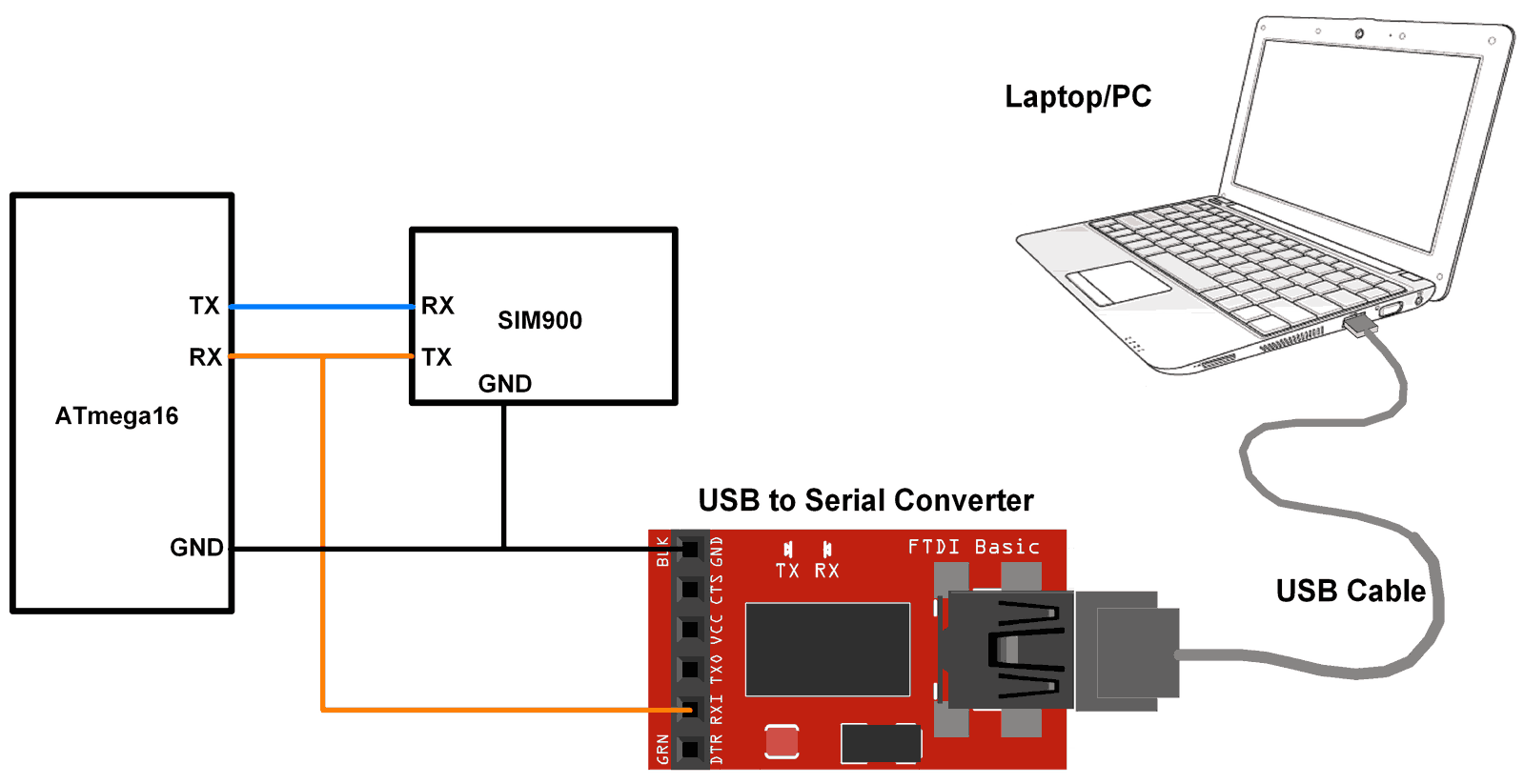
At the client end, we need to check SIM900 responses. We can check it on the serial terminal of the PC/Laptop. Connect SIM900 transmit pin (TX) to the receive pin (RX) of Atmega16 Microcontroller and to the receive pin (RX) of USB to serial converter as shown in the below figure. connect USB to serial converter to PC/Laptop. Open the serial terminal on the PC/Laptop to see the SIM900 responses for the AT command sent from the Atmega16 microcontroller.
Now for HTTP POST commands (sent from ATmega16 Microcontroller), we can see the below response from SIM900 on the serial terminal for the Thingspeak server.
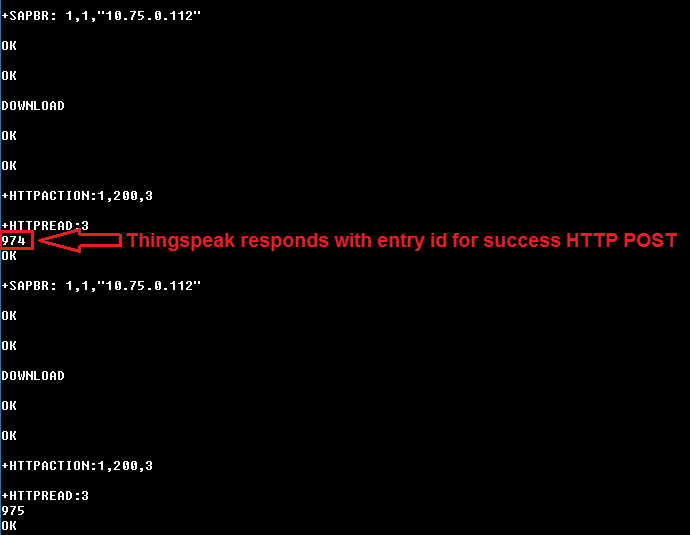
In response to HTTP POST, we get the data entry no. as shown in the above figure i.e. 974, 975, and so on.
For HTTP GET commands (sent from ATmega16 Microcontroller), we can see the below response from SIM900 on the serial terminal for the Thingspeak server.
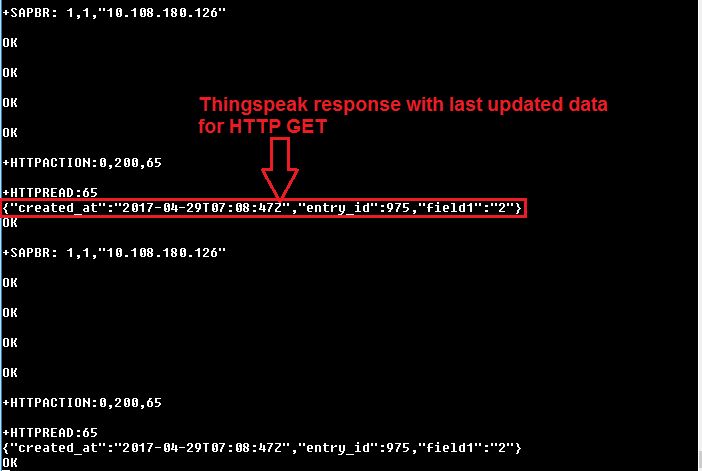
In response to HTTP GET, we get the last entry data for field1 on Thingspeak as shown in the above figure.
Note: here we are retrieving the last entry data on field1 of the Thingspeak server hence we get the last updated data of field1 from the server as shown in the above figure i.e. “field1”:”2”. In the program, we used "api.thingspeak.com/channels/119922/feeds/last.txt" to receive the last updated data only.
Updates at Thingspeak server on HTTP POST
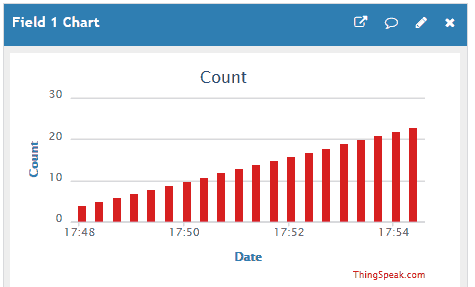
For HTTP POST, we can see the output at the server end. Here we are using the Thingspeak server and sending the incremented count at field1 on the server. We get incremented count at field1 of Thingspeak server as shown in the below figure.
HTTP Client with Adafruit dashboard
In the IOT platform, Adafruit IO Dashboard allows us to visualize and control the connected device to the internet. Anyone can visualize and analyze live data from their sensor devices. To learn more and start with Adafruit IO Dashboard refer link https://learn.adafruit.com/adafruit-io-basics-dashboards/creating-a-dashboard
Just sign up and create a dashboard. After the successful creating of a dashboard, we will get the AIO key which is later used to access feed data.
Example
Now let’s program AVR-based ATmega16 to control LED and monitor the status of Switch from the Adafruit dashboard.
Once we created a dashboard on Adafruit we can add various blocks that can be used to control devices as well as monitor the status of devices. To see more about blocks, refer link https://learn.adafruit.com/adafruit-io-basics-dashboards/adding-blocks
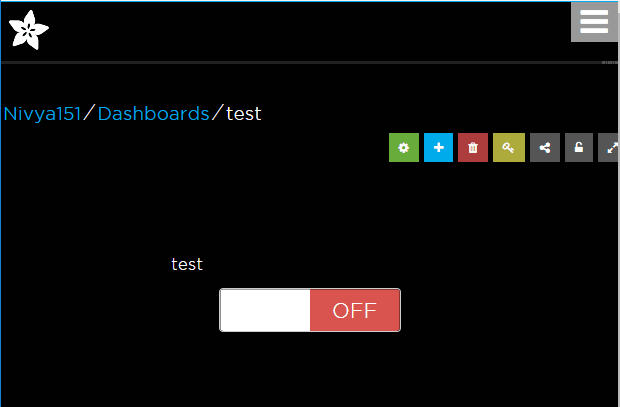
In this example, we have added a toggle button block in the dashboard as shown in the below figure to control LED as well as to know the status of the switch.
Let’s interface LED, Switch and SIM900 Module with ATmega16.
Interfacing Diagram
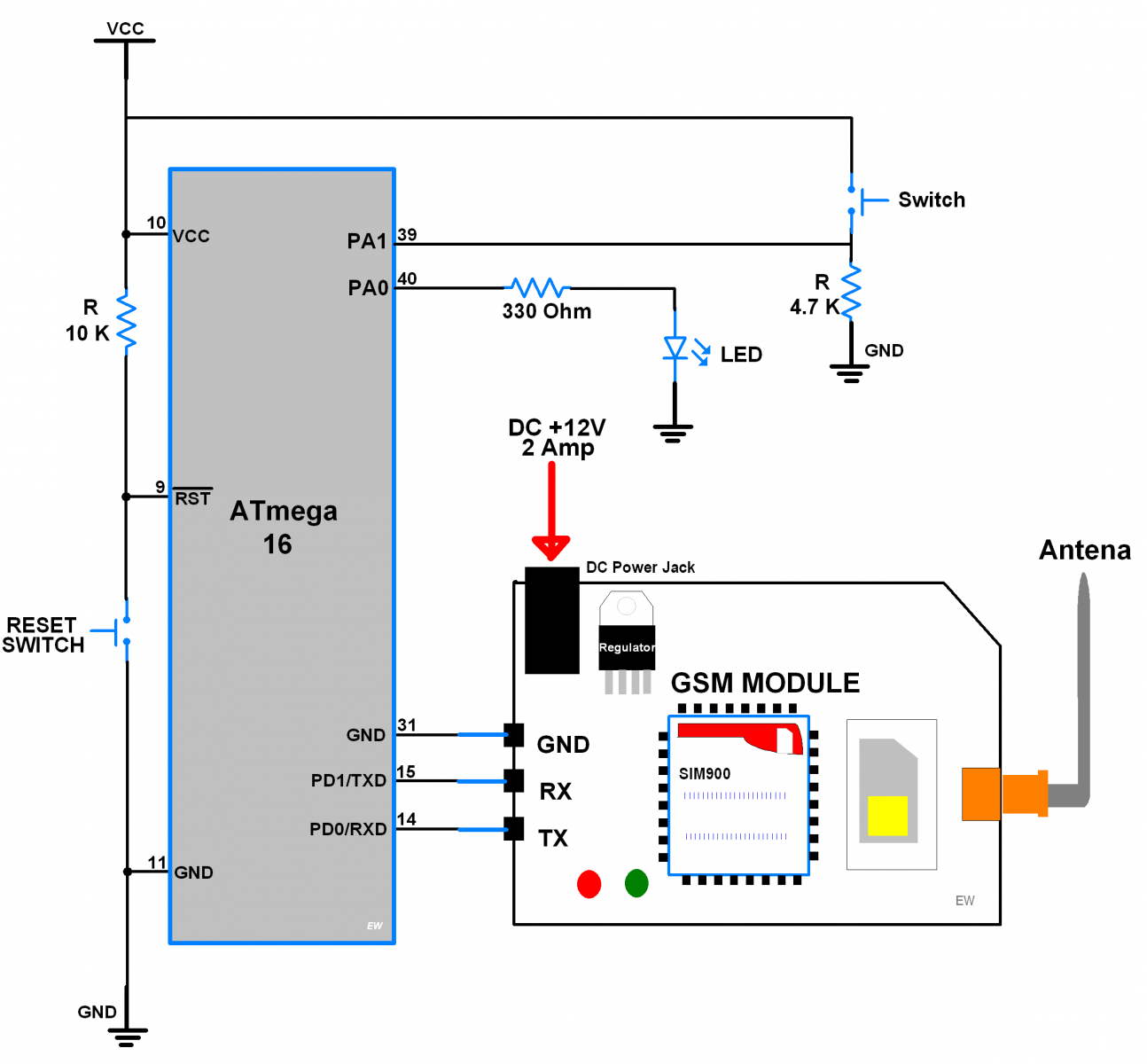
In the below program do the following
For LED Control
#define GET_DEMO			/* Define GET demo */
//#define POST_DEMO			/* Define POST demo */
For Switch Status
//#define GET_DEMO			/* Define GET demo */
#define POST_DEMO			/* Define POST demo */
Define below fields in the given program
#define AIO_SERVER	"io.adafruit.com"		/* Adafruit server */
#define AIO_BASE_URL	"/api/v2"			/* Base URL for api */
#define AIO_USERNAME	"Enter Username"	/* Enter username here */
#define AIO_KEY		"Enter AIO key"			/* Enter AIO key here */
#define AIO_FEED	"Enter Feed Key"		/* Enter feed key */

#define APN		"internet"					/* APN of network service provider */
#define USERNAME	""
#define PASSWORD	""
Building the URL parameter for Adafruit IO dashboard
For HTTPClient GET operation we need to use below URL format
io.adafruit.com/api/v2/AIO_Username/feeds/AIO_feed_key/data?x-aio-key=AIO_key
to get last updated data only use
io.adafruit.com/api/v2/AIO_Username/feeds/AIO_feed_key/data/last?x-aio-key=AIO_key
For HTTPClient POST operation we need to set below URL first
io.adafruit.com/api/v2/AIO_Username/feeds/AIO_feed_key/data?x-aio-key=AIO_key
and then post data only afterword’s in JSON format given below
{
  "value": "string",
  "created_at": "string",
  "lat": "string",
  "lon": "string",
  "ele": "string",
  "epoch": 0
}
e.g.
{"value":"your data","created_at":"2050-01-01T00:00:00Z","lat":0,"lon":0,"ele":0,"epoch": 0}
Program for HTTP Client with Adafruit Dashboard
/*
 * ATmega16_GPRS_HTTPClient
 * http://www.electronicwings.com
 */


#define F_CPU 8000000UL			/* Define CPU clock Frequency e.g. here its 8MHz */
#include <avr/io.h>			/* Include AVR std. library file */
#include <string.h>			/* Include string library */
#include <stdio.h>			/* Include standard IO library */
#include <stdlib.h>			/* Include standard library */
#include <stdbool.h>			/* Include standard boolean library */
#include <util/delay.h>			/* Include delay header file */
#include <avr/interrupt.h>		/* Include avr interrupt header file */
#include "USART_RS232_H_file.h"		/* Include USART header file */

#define SREG    _SFR_IO8(0x3F)

#define DEFAULT_BUFFER_SIZE	200	/* Define default buffer size */
#define DEFAULT_TIMEOUT		10000	/* Define default timeout */
#define DEFAULT_CRLF_COUNT	2	/* Define default CRLF count */

#define POST			1	/* Define method */
#define GET			0

/* Select Demo */
#define GET_DEMO			/* Define GET demo */
//#define POST_DEMO			/* Define POST demo */

/* Define Required fields below */
#define AIO_SERVER		"io.adafruit.com"	/* Adafruit server */
#define AIO_BASE_URL		"/api/v2"		/* Base URL for api */
#define AIO_USERNAME		"Enter Username"	/* Enter username here */
#define AIO_KEY			"Enter AIO key"		/* Enter AIO key here */
#define AIO_FEED		"Enter Feed Key"	/* Enter feed key */

#define APN			"internet"		/* APN of Internet service provider */
#define USERNAME		""
#define PASSWORD		""


#ifdef POST_DEMO
	#define SWITCH_PIN		PINA1
	#define SWITCH_ON		"ON"
	#define SWITCH_OFF		"OFF"
#endif

#ifdef GET_DEMO
	#define LED_PIN			PINA0
	#define LED_ON			PORTA |= (1 << LED_PIN);
	#define LED_OFF			PORTA &= ~(1 << LED_PIN);
#endif

enum SIM900_RESPONSE_STATUS		/* Enumerate response status */
{
	SIM900_RESPONSE_WAITING,
	SIM900_RESPONSE_FINISHED,
	SIM900_RESPONSE_TIMEOUT,
	SIM900_RESPONSE_BUFFER_FULL,
	SIM900_RESPONSE_STARTING,
	SIM900_RESPONSE_ERROR
};

int8_t Response_Status, CRLF_COUNT = 0;
uint16_t Counter = 0;
uint32_t TimeOut = 0;
char RESPONSE_BUFFER[DEFAULT_BUFFER_SIZE];

void Read_Response()		/* Read response */
{
   static char CRLF_BUF[2];
   static char CRLF_FOUND;
   uint32_t TimeCount = 0, ResponseBufferLength;
   while(1)
   {
      if(TimeCount >= (DEFAULT_TIMEOUT+TimeOut))
	{
	   CRLF_COUNT = 0; TimeOut = 0;
	   Response_Status = SIM900_RESPONSE_TIMEOUT;
	   return;
	}

      if(Response_Status == SIM900_RESPONSE_STARTING)
	{
	   CRLF_FOUND = 0;
	   memset(CRLF_BUF, 0, 2);
	   Response_Status = SIM900_RESPONSE_WAITING;
	}
      ResponseBufferLength = strlen(RESPONSE_BUFFER);
      if (ResponseBufferLength)
	{
	   _delay_ms(1);
	   TimeCount++;
	   if (ResponseBufferLength==strlen(RESPONSE_BUFFER))
	      {
		for (uint16_t i=0;i<ResponseBufferLength;i++)
		{
		   memmove(CRLF_BUF, CRLF_BUF + 1, 1);
		   CRLF_BUF[1] = RESPONSE_BUFFER[i];
		   if(!strncmp(CRLF_BUF, "\r\n", 2))
		   {
		      if(++CRLF_FOUND == (DEFAULT_CRLF_COUNT+CRLF_COUNT))
			{
			   CRLF_COUNT = 0; TimeOut = 0;
			   Response_Status = SIM900_RESPONSE_FINISHED;
			   return;
			}
		   }
		}
	   CRLF_FOUND = 0;
	}
      }
      _delay_ms(1);
      TimeCount++;
   }
}

void Start_Read_Response()
{
	Response_Status = SIM900_RESPONSE_STARTING;
	do {
		Read_Response();
	} while(Response_Status == SIM900_RESPONSE_WAITING);
}

void Buffer_Flush()			/* Flush all variables */
{
	memset(RESPONSE_BUFFER, 0, DEFAULT_BUFFER_SIZE-1);
	Counter=0;
}

/* Remove CRLF and other default strings from response */
void GetResponseBody(char* Response, uint16_t ResponseLength)
{
	uint16_t i = 12;
	char buffer[5];
	while(Response[i] != '\r' && i < 100)
		++i;

	strncpy(buffer, Response + 12, (i - 12));
	ResponseLength = atoi(buffer);

	i += 2;
	uint16_t tmp = strlen(Response) - i;
	memcpy(Response, Response + i, tmp);

	if(!strncmp(Response + tmp - 6, "\r\nOK\r\n", 6))
	memset(Response + tmp - 6, 0, i + 6);
}

bool WaitForExpectedResponse(char* ExpectedResponse)
{
	Buffer_Flush();
	_delay_ms(200);
	Start_Read_Response();		/* First read response */
	if((Response_Status != SIM900_RESPONSE_TIMEOUT) && (strstr(RESPONSE_BUFFER, ExpectedResponse) != NULL))
		return true;		/* Return true for success */
	return false;			/* Else return false */
}

bool SendATandExpectResponse(char* ATCommand, char* ExpectedResponse)
{
	USART_SendString(ATCommand);	/* Send AT command to SIM900 */
	USART_TxChar('\r');
	return WaitForExpectedResponse(ExpectedResponse);
}

bool HTTP_Parameter(char* Parameter, char* Value)/* Set HTTP parameter and return response */
{

	USART_SendString("AT+HTTPPARA=\"");
	USART_SendString(Parameter);
	USART_SendString("\",\"");
	USART_SendString(Value);
	USART_SendString("\"\r");
	return WaitForExpectedResponse("OK");
}

bool SIM900HTTP_Start()			/* Check SIM900 board */
{
	for (uint8_t i=0;i<5;i++)
	{
		if(SendATandExpectResponse("ATE0","OK")||SendATandExpectResponse("AT","OK"))
		{
			HTTP_Parameter("CID","1");
			return true;
		}
	}
	return false;
}

bool SIM900HTTP_Connect(char* _APN, char* _USERNAME, char* _PASSWORD) /* Connect to GPRS */
{

	USART_SendString("AT+CREG?\r");
	if(!WaitForExpectedResponse("+CREG: 0,1"))
		return false;

	USART_SendString("AT+SAPBR=0,1\r");
	WaitForExpectedResponse("OK");

	USART_SendString("AT+SAPBR=3,1,\"CONTYPE\",\"GPRS\"\r");
	WaitForExpectedResponse("OK");

	USART_SendString("AT+SAPBR=3,1,\"APN\",\"");
	USART_SendString(_APN);
	USART_SendString("\"\r");
	WaitForExpectedResponse("OK");

	USART_SendString("AT+SAPBR=3,1,\"USER\",\"");
	USART_SendString(_USERNAME);
	USART_SendString("\"\r");
	WaitForExpectedResponse("OK");

	USART_SendString("AT+SAPBR=3,1,\"PWD\",\"");
	USART_SendString(_PASSWORD);
	USART_SendString("\"\r");
	WaitForExpectedResponse("OK");

	USART_SendString("AT+SAPBR=1,1\r");
	return WaitForExpectedResponse("OK");
}

bool HTTP_Init()			/* Initiate HTTP */
{
	USART_SendString("AT+HTTPINIT\r");
	return WaitForExpectedResponse("OK");
}

bool HTTP_Terminate()			/* terminate HTTP */
{
	USART_SendString("AT+HTTPTERM\r");
	return WaitForExpectedResponse("OK");
}

bool HTTP_SetURL(char * url)		/* Set URL */
{
	return HTTP_Parameter("URL", url);
}

bool HTTP_Connected()			/* Check for connected */
{
	USART_SendString("AT+SAPBR=2,1\r");
	CRLF_COUNT = 2;										/* Make additional crlf count for response */
	return WaitForExpectedResponse("+SAPBR: 1,1");
}

bool HTTP_SetPost_json()		/* Set Json Application format for post */
{
	return HTTP_Parameter("CONTENT", "application/json");
}

bool HTTP_Save()			/* Save the application context */
{
	USART_SendString("AT+HTTPSCONT\r");
	return WaitForExpectedResponse("OK");
}

bool HTTP_Data(char* data)		/* Load HTTP data */
{
	char _buffer[25];
	sprintf(_buffer, "AT+HTTPDATA=%d,%d\r", strlen(data), 10000);
	USART_SendString(_buffer);

	if(WaitForExpectedResponse("DOWNLOAD"))
		return SendATandExpectResponse(data, "OK");
	else
		return false;
}

bool HTTP_Action(char method)		/* Select HTTP Action */
{
	if(method == GET)
		USART_SendString("AT+HTTPACTION=0\r");
	if(method == POST)
		USART_SendString("AT+HTTPACTION=1\r");
	return WaitForExpectedResponse("OK");
}

bool HTTP_Read(uint8_t StartByte, uint16_t ByteSize) /* Read HTTP response */
{
	char Command[25];
	sprintf(Command,"AT+HTTPREAD=%d,%d\r",StartByte,ByteSize);
	Command[25] = 0;
	USART_SendString(Command);

	CRLF_COUNT = 2;										/* Make additional crlf count for response */
	if(WaitForExpectedResponse("+HTTPREAD"))
	{
		GetResponseBody(RESPONSE_BUFFER, ByteSize);
		return true;
	}
	else
		return false;
}

uint8_t HTTP_Post(char* Parameters, uint16_t ResponseLength)
{
	HTTP_Parameter("CID","1");	/* set Bearer profile identifier */
	if(!(HTTP_Data(Parameters) && HTTP_Action(POST)))
	return SIM900_RESPONSE_TIMEOUT;

	bool status200 = WaitForExpectedResponse(",200,");

	if(Response_Status == SIM900_RESPONSE_TIMEOUT)
	return SIM900_RESPONSE_TIMEOUT;
	if(!status200)
	return SIM900_RESPONSE_ERROR;

	HTTP_Read(0, ResponseLength);
	return SIM900_RESPONSE_FINISHED;
}

uint8_t HTTP_get(char * _URL, uint16_t ResponseLength)
{
	HTTP_Parameter("CID","1");	/* set Bearer profile identifier */
	HTTP_Parameter("URL", _URL);
	HTTP_Action(GET);
	WaitForExpectedResponse("+HTTPACTION:0,");
	if(Response_Status == SIM900_RESPONSE_TIMEOUT)
	return SIM900_RESPONSE_TIMEOUT;

	HTTP_Read(0, ResponseLength);
	return SIM900_RESPONSE_FINISHED;
}

bool SIM900HTTP_Init()
{
	HTTP_Terminate();
	return HTTP_Init();
}

ISR (USART_RXC_vect)			/* Receive ISR routine */
{
	uint8_t oldsrg = SREG;
	RESPONSE_BUFFER[Counter] = UDR;	/* Copy data to buffer & increment counter */
	Counter++;
	if(Counter == DEFAULT_BUFFER_SIZE)
	Counter = 0;
	SREG = oldsrg;
}

int main()
{
	char _buffer[150];

	#ifdef GET_DEMO
	DDRA |= (1 << LED_PIN);
	#endif

	#ifdef POST_DEMO
	DDRA &= ~(1 << SWITCH_PIN);
	#endif

	USART_Init(9600);		/* Initiate USART with 9600 baud rate */
	sei();				/* Enable global interrupt */
	while(!SIM900HTTP_Start());
	while(!(SIM900HTTP_Connect(APN, USERNAME, PASSWORD)));
	SIM900HTTP_Init();

	#ifdef POST_DEMO
	sprintf(_buffer, "%s%s/%s/feeds/%s/data?x-aio-key=%s", AIO_SERVER, AIO_BASE_URL, AIO_USERNAME, AIO_FEED, AIO_KEY);
	HTTP_SetURL(_buffer);
	HTTP_SetPost_json();
	HTTP_Save();
	#endif

	while(1)
	{
		if (!HTTP_Connected())	/* Check whether GPRS connected */
		{
		  SIM900HTTP_Connect(APN, USERNAME, PASSWORD);
		  SIM900HTTP_Init();
		}
		/* Define required response length from server */
		uint16_t responseLength = 100;
		char buf[5];

		#ifdef POST_DEMO	/* POST Sample data on server */
		memset(_buffer, 0, 150); memset(buf, 0, 4);
		if(PINA & (1<<SWITCH_PIN))	strncpy(buf, SWITCH_ON, 2);
		else	strncpy(buf, SWITCH_OFF, 3);
		sprintf(_buffer, "{\"value\":\"%s\",\"created_at\":\"2050-01-01T00:00:00Z\",\"lat\":0,\"lon\":0,\"ele\":0,\"epoch\":0}", buf);
		HTTP_Post(_buffer, responseLength);
		#endif

		#ifdef GET_DEMO		/* GET last sample data from server */
		uint16_t valuePointer = 0;
		memset(_buffer, 0, 150); memset(buf, 0, 5);
		sprintf(_buffer, "%s%s/%s/feeds/%s/data/last?x-aio-key=%s", AIO_SERVER, AIO_BASE_URL, AIO_USERNAME, AIO_FEED, AIO_KEY);
		HTTP_get(_buffer, responseLength);
		for (uint16_t i=0; i<responseLength;i++)
		{
			for (uint8_t k = 0; k < 5; k++)
				buf[k] = RESPONSE_BUFFER[i + k];
			if (strstr(buf, "value") != 0)
			{
				valuePointer = i + 8;
				i = responseLength;
			}
		}
		for (uint16_t i=0; RESPONSE_BUFFER[valuePointer + i] != '"' && i<5; i++)
			buf[i] = RESPONSE_BUFFER[valuePointer + i];
		if (strstr(buf, "ON") != 0)	LED_ON
		else	LED_OFF
		Buffer_Flush();
		#endif
	}
}
Video of Control the LED using GPRS and ATmega16
Components Used
Powered by
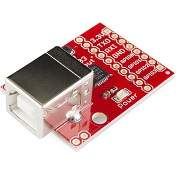
CP2103 is single chip USB to UART Bridge. It supports USB 2.0 protocol.
634-CP2103-GMR

SIM900A is dual band GSM/GPRS 900/1800MHz module board used to utilize GSM and GPRS services around the globe. It is used to make/receive voice calls, send/receive text messages, connect to and access the internet over GPRS.
170-M031-D
Downloads
Comments17
Join the discussion — share a question or tip.
- BA
hey , i am currently facing a problem i need to show you my code (taken from above code the one with thinkspeak and modified a little) a year ago the modified code worked but now with the new atmega 16 board its not means the code gets compiled and run till the last line before the data is being uploaded to thinkspeak and then the int main keeps repeating
- OM
Thanks Brother
- PRpratikshirsat0007· edited
I have to show the receive data on Usart how can i show it in usart and Lcd i try to show the _buffer value in usart but it shows wrong valve
- ME
Replying to @lokeshc
@Lokesh Chandak: hi, when i use the below snippet in while loop, the code dont enter in main loop. Nothing executes when i use the below code. #ifdef POST_DEMO /* POST Sample data on server */ memset(_buffer, 0, 100); sprintf(_buffer, "field1=%d",Sample++); HTTP_Post(_buffer, responseLength); DELAY_ms(15000); /* Thingspeak server delay */ #endif But if i comment the code above, the code enters and all the parameters is executing as needed. Please correct me.
- LO
Replying to @mejunkie
@Junkie madi: make sure that you have uncommented only either method i.e. GET_demo or POST_demo. Currently, above example program has only one method support provided at a time. Both method not supported. Above program works for either Get method or Post method. Because of your query, we get to know that it should work for both methods if required. Thanks for your query. So, we will update it right now. Right now you can move the below two lines in #ifdef POST_demo inside while(1) loop, HTTP_SetURL(URL); HTTP_Save(); After making above change, it will work for both methods at a time.
- ME
Replying to @lokeshc
@Lokesh Chandak: Thanks for your reply. I have sending the AT command AT+GSN to store IMEI number in buffer of char imei[16]. But when am trying to display imei, i always getting the response from buffer as 862631038584444 OK i don't need this OK. Also if you see the imei buffer is 16 characters only, but how am getting OK is not cleared. Below code as mentioned to read; int main() { UART1_TxString("AT+GSN\r"); WaitForExpectedResponse("OK"); UART1Buffer[ResponseBufferLength-1]='\0'; strcpy(imei,UART1Buffer); UART0_Printf("%s\n\r",imei); } Remaining code read response are same as your code.
- ME
Replying to @lokeshc
@Lokesh Chandak: Hi, i have query on sending the data to server using post method. As above mentioned in your code, When am sending the data to the Parser URL, the data sent successfully but in binary format to the parser URL. I want to send the data in text format. Format: #;<IMEI>;<date>;<time>;<Temp>;<Humi> Let me know where am getting wrong.
- LO
Replying to @mejunkie
@Junkie madi: @ If you want to send data in text format to the server then you can refer below function bool HTTP_SetPost_json() /* Set Json Application format for post */ { return HTTP_Parameter("CONTENT", "application/json"); } Just replace "application/json" with "application/text"
- ME
Replying to @lokeshc
@Lokesh Chandak: Hi, there is an issue with Sprintf. sprintf(_buffer,"#;%s;%d-%02d-%02d;%02d:%02d;%s;%s",imei,(uint16_t)rtc.year,(uint16_t)rtc.month,(uint16_t)rtc.date,(uint16_t)rtc.hour,(uint16_t)rtc.min,temp,humidity); The print should be like this below one as per sprintf buffer #;862631038585444;2017-10-13;12:05;32.20;.44.26 But what am getting is this below #;86263103858544432.20;2017-10-13;12:05;32.20;.44.26 I don't know, why 32.20 is repeating after IMEI. Where am going wrong?
- LO
Replying to @mejunkie
@Junkie madi: try following things 1. check your buffer size at least it should more than it required 2. clear your complete buffer before sprintf 3. take IMEI,temp and humidity string/buffer size more than it required at least by 2 or 3 bytes 4. clear IMEI, temp, humidity buffers completely before copying data to them. 5. make sure about IMEI, temp, humidity strings ended with null.
- ME
Replying to @lokeshc
@Lokesh Chandak: Thanks for your reply. Am using buffer char imei[16] to store the imei number received in UART buffer. I used the below code to store. strncpy(imei,UART1Buffer+1,16); imei[16]='\0'; When am sending the string to the server according to my string format, am getting space/new line character in the format. And remaining everything is fine as per the string. format is #;<imei>;<year-month-date>;<hours:mins>;temp;humid #; 862631038585444;2017-10-14;16:45;24.39;34.39 In the above string, there is a space after first two characters i.e before a 8 character. Tried changing in the code, but nothing seems work. Where am getting wrong? I really appreciate your quick response Lokesh. Thanks.
- LO
Replying to @mejunkie
@Junkie madi: Hello Junkie, if you get space in your imei buffer before 8 then make sure about UART1Buffer data from where you are copying it. if you still facing it then try to rotate buffer left by one byte and the add it to main string. and also take care while adding null character to your imei buffer as imei[16]='\0'; it means your imei buffer has size>17. but you declared buffer size as 16 for which end character should be at imei[15]='\0' if you still facing issue please share your code snip.
- ME
Replying to @lokeshc
@Lokesh Chandak: Thanks for the reply. Sharing the snippet below. char imei[16]; int main() { UART1_TxString("AT+GSN\r"); WaitForExpectedResponse("OK"); strncpy(imei,UART1Buffer+1,16); imei[16]='\0'; } In ISR, am reading the UART1buffer. And in main function, copying the UART1Buffer to IMEI buffer using strncpy. IMEI number will be 15 characters. Let me know if i can share anything else.
- AUauthorized· edited
Replying to @mejunkie
@Junkie madi: hey, well try junkie..! you can do it in many ways....!!! just find your imei start index location and then copy 15 bytes of imei in your imei buffer for example, char imei[16]; int main() { UART1_TxString("AT+GSN\r"); WaitForExpectedResponse("OK"); for(int i=0; i<strlen(UART1Buffer); i++){ if('0' <= UART1Buffer[i] && UART1Buffer[i] <= '9'){ //find start index strncpy(imei, UART1Buffer+i, 15); //copy imei from uart buffer imei[15] = '\0'; //add null character at end i = strlen(UART1Buffer); //get out from for loop } } } once you get your imei then you can use it in your application where you want have a nice time..!!