ESP8266 WiFi Module Interfacing with Arduino UNO
ESP8266 is Wi-Fi enabled system on chip (SoC) module developed by Espressif system. It is mostly used for development of IoT (Internet of Things) embedded applications.
Overview of ESP8266 Wi-Fi Module
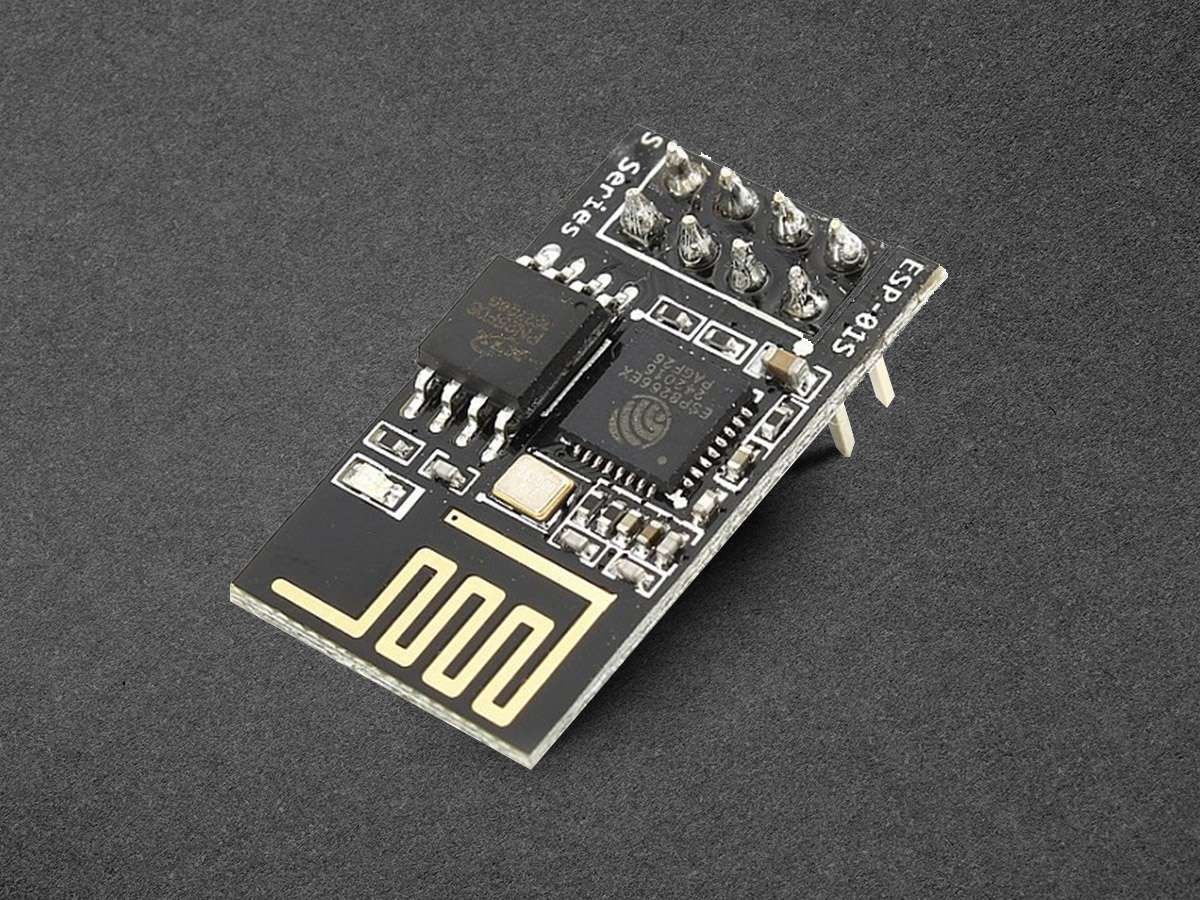
The ESP8266 wifi module is low cost standalone wireless transceiver that can be used for end-point IoT developments.
ESP8266 wifi module enables internet connectivity to embedded applications. It uses TCP/UDP communication protocol to connect with the server/client.
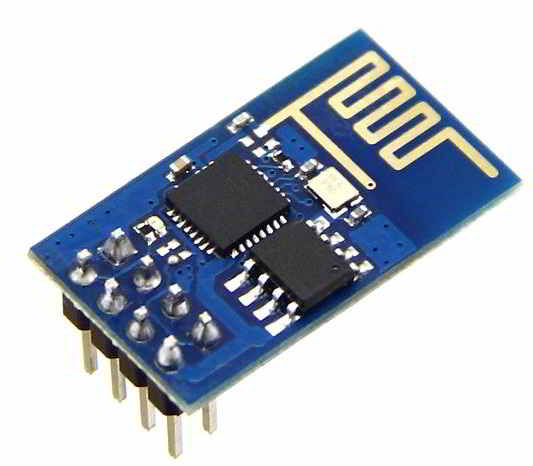
To communicate with the ESP8266 wifi module, microcontroller needs to use set of AT commands. The microcontroller communicates with ESP8266-01 wifi module using UART having specified Baud rate (Default 115200).
To know more about ESP8266 wifi Module and its firmware refer ESP8266 WiFi Module
Now let’s interface ESP8266 wifi Module with Arduino UNO.
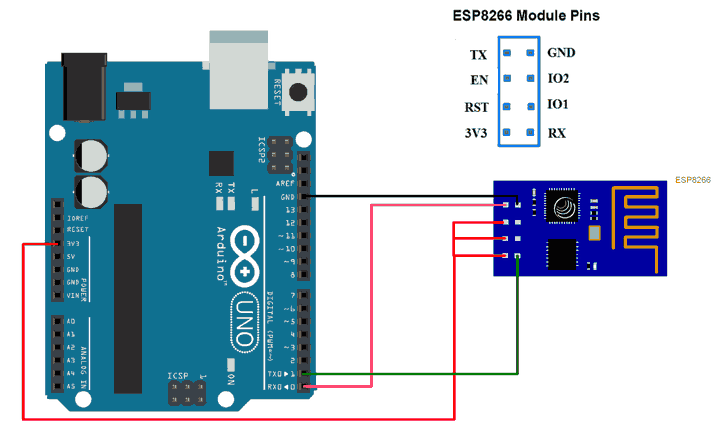
Connection Diagram of ESP8266 with Arduino
TCP Client using ESP8266 WiFi Module
Let’s program Arduino UNO to configure the ESP8266 wifi module as TCP Client and Receive/Send data from/to the Server using WIFI.
Here, we are using the Thingspeak server for TCP Client demo purposes.
Thingspeak is an open IoT platform where anyone can visualize and analyze live data from their sensor devices. Also, we can perform data analysis on data posted by remote devices with Matlab code in Thingspeak. To learn more about Thingspeak refer link https://thingspeak.com/pages/learn_more
Just sign up and create a channel. We have the below channel and write key available on Thingspeak for data send and receive.
channel ID is = 119922
Write Key is = C7JFHZY54GLCJY38
Note: Do not forget to tick Make Public field in channel setting option on your thingspeak channel. It makes channel available to use as public. This allows any user to access channel data without any username & password.
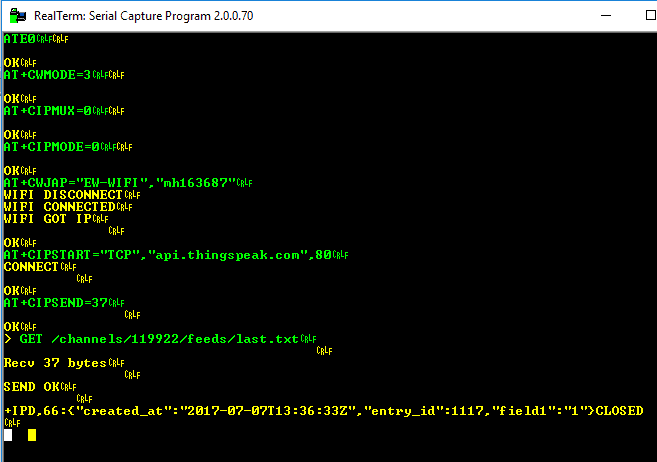
For TCP RECEIVE method use the below AT command steps shown in the screenshot of RealTerm Serial Terminal.
Below screenshot consists of AT commands (Green) and Responses (Yellow).
For TCP SEND method use the below AT command steps shown in the screenshot of RealTerm Serial Terminal.
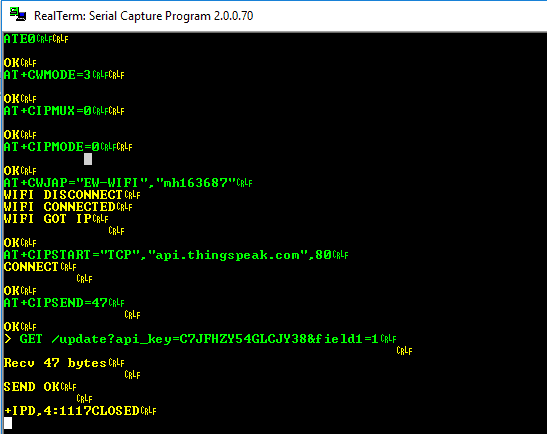
For accessing required functionality i.e. TCP receive or send make changes in the program as per given below,
For TCP Client RECEIVE demo
#define RECEIVE_DEMO        /* Define RECEIVE demo */
//#define SEND_DEMO         /* Define SEND demo */
For TCP Client SEND demo
//#define RECEIVE_DEMO     /* Define RECEIVE demo */
#define SEND_DEMO          /* Define SEND demo */
Edit fields below with respective data in the header file of ESP8266
/* Define Required fields shown below */
#define DOMAIN           "api.thingspeak.com"
#define PORT             "80"
#define API_WRITE_KEY    " Thingspeak Write Key "
#define CHANNEL_ID       " Thingspeak Channel ID "
#define SSID             " WiFi SSID "
#define PASSWORD         " WiFi Password "
ESP8266 WiFi Code for Arduino Uno
/*
 * ESP8266 wifi module Interfacing with Arduino Uno
 * http://www.electronicwings.com
 */

#include "ESP8266_AT.h"

/* Select Demo */
//#define RECEIVE_DEMO			/* Define RECEIVE demo */
#define SEND_DEMO				/* Define SEND demo */

/* Define Required fields shown below */
#define DOMAIN          "api.thingspeak.com"
#define PORT            "80"
#define API_WRITE_KEY   "Write your Write Key here"
#define CHANNEL_ID      "Write your Channel ID here"

#define SSID            "Write your WIFI SSID here"
#define PASSWORD        "Write your WIFI Password here"

char _buffer[150];
uint8_t Connect_Status;
#ifdef SEND_DEMO
uint8_t Sample = 0;
#endif

void setup() {
    Serial.begin(115200);

    while(!ESP8266_Begin());
    ESP8266_WIFIMode(BOTH_STATION_AND_ACCESPOINT);	/* 3 = Both (AP and STA) */
    ESP8266_ConnectionMode(SINGLE);     			/* 0 = Single; 1 = Multi */
    ESP8266_ApplicationMode(NORMAL);    			/* 0 = Normal Mode; 1 = Transperant Mode */
    if(ESP8266_connected() == ESP8266_NOT_CONNECTED_TO_AP)/*Check WIFI connection*/
    ESP8266_JoinAccessPoint(SSID, PASSWORD);		/*Connect to WIFI*/
    ESP8266_Start(0, DOMAIN, PORT);
}

void loop() {
    Connect_Status = ESP8266_connected();
    if(Connect_Status == ESP8266_NOT_CONNECTED_TO_AP)	/*Again check connection to WIFI*/
    ESP8266_JoinAccessPoint(SSID, PASSWORD);			/*Connect to WIFI*/
    if(Connect_Status == ESP8266_TRANSMISSION_DISCONNECTED)
    ESP8266_Start(0, DOMAIN, PORT);						/*Connect to TCP port*/

    #ifdef SEND_DEMO
    memset(_buffer, 0, 150);
    sprintf(_buffer, "GET /update?api_key=%s&field1=%d", API_WRITE_KEY, Sample++); 	/*connect to thingspeak server to post data using your API_WRITE_KEY*/
    ESP8266_Send(_buffer);
    delay(15000); 										/* Thingspeak server delay */
    #endif

    #ifdef RECEIVE_DEMO
    memset(_buffer, 0, 150);
    sprintf(_buffer, "GET /channels/%s/feeds/last.txt", CHANNEL_ID); /*Connect to thingspeak server to get data using your channel ID*/
    ESP8266_Send(_buffer);
    Read_Data(_buffer);
    delay(600);
    #endif
  }
ESP8266 Response on Arduino Uno
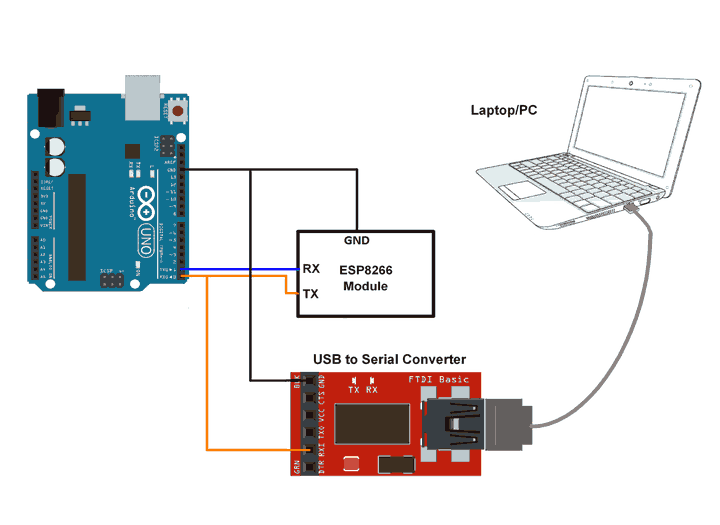
At the client's end, we need to check ESP8266 responses. We can check it on the serial terminal of PC/Laptop. Connect the ESP8266 module transmit pin (TX) to the receive pin (RX) of Arduino UNO and to receive pin (RX) of the USB to the serial converter as shown below figure. connect USB to serial converter to PC/Laptop. Open the serial terminal on the PC/Laptop to see the ESP8266 responses for the AT command sent from Arduino UNO.
Now for TCP SEND commands (sent from Arduino UNO module), we can see the below response from ESP8266 on the serial terminal for the thingspeak server.
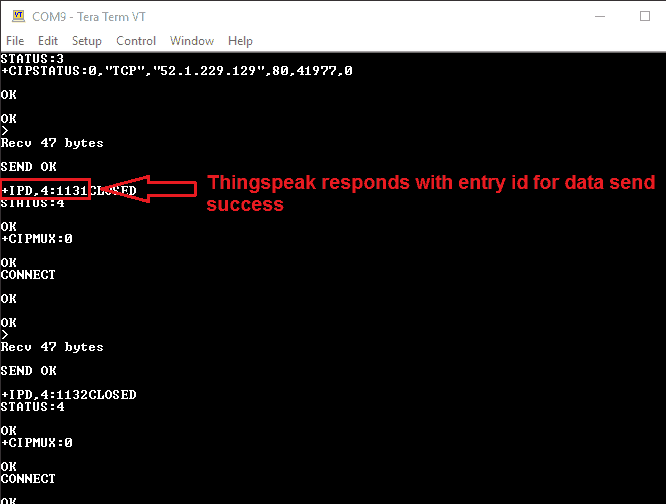
In response with TCP SEND we get the data entry no. as shown in above figure i.e. 1131, 1132, and so on.
For TCP RECEIVE commands (sent from Arduino UNO Module), we can see the below response from ESP8266 on the serial terminal for the thingspeak server.
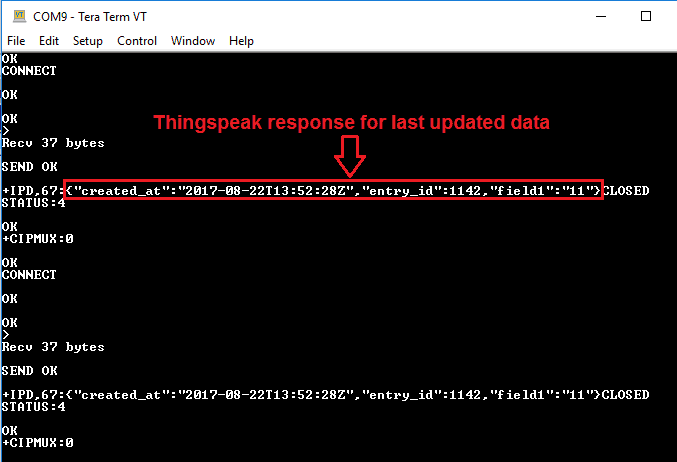
In response to TCP RECEIVE we get the last entry data for field 1 on thingspeak as shown in the above figure.
Note: here we are retrieving the last entry data on field1 of thingspeak server hence we get the last updated data of field1 from server as shown in above figure i.e. “field1”:”11”. In program, we used "GET /channels/119922/feeds/last.txt" to receive last updated data only.
Updates at thingspeak server on TCP SEND
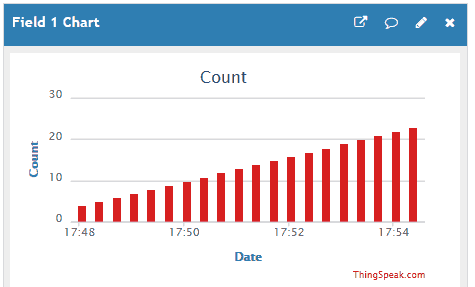
For TCP SEND we can see the output at the server end. Here we are using thingspeak server and sending incremented count to field 1 on the server. We get incremented count at field1 of thingspeak server as shown in the figure below.
Components Used
Powered by
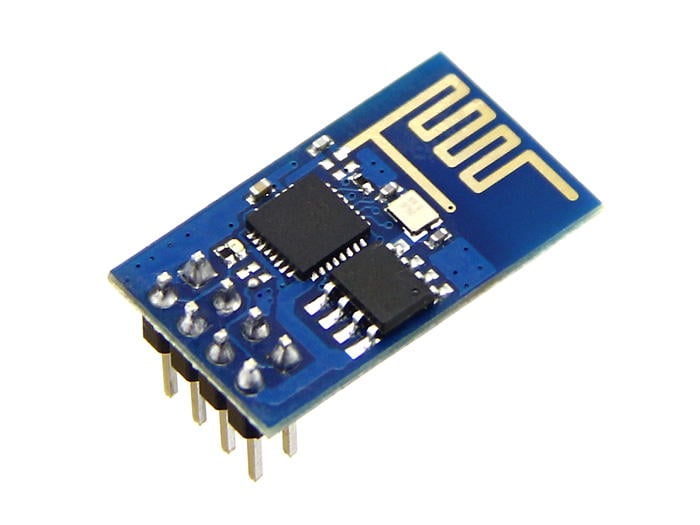
ESP8266 is a system on chip (SoC) which provides WIFI capability for embedded applications. This enables internet connectivity to embedded applications. ESP8266 modules are mostly used in Internet of Things(IoT) applications.
909-MOD-WIFI-ESP8266
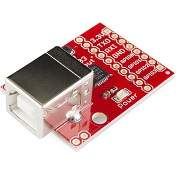
CP2103 is single chip USB to UART Bridge. It supports USB 2.0 protocol.
634-CP2103-GMR
Downloads
Comments18
Join the discussion — share a question or tip.
- PI
Where to download this `ESP8266 WiFi Module Library for Proteus`?
- CA
Integrating the esp8266 with arduino has been such a terrible experience for me. Many of the guides I find for the esp8266 are for the chip itself, and not for arduino interfacing. And when I do actually find guides like this that explain exactly what I want, they use libraries that are no longer available. If I'd known it was this much of a nightmare to add wifi to an arduino I would have never started this project on an arduino uno
- CA
Thanks for this great page. Is there another place to find the library? The link from mythri1020 in the comments is no longer working.
- 10
What is use of serial to parallel converter?
- RA
while uploading esp8266 code,it shows me error Arduino: 1.8.19 (Windows Store 1.8.57.0) (Windows 10), Board: "Generic ESP8266 Module, 80 MHz, Flash, Disabled (new aborts on oom), Disabled, All SSL ciphers (most compatible), 32KB cache + 32KB IRAM (balanced), Use pgm_read macros for IRAM/PROGMEM, dtr (aka nodemcu), 26 MHz, 40MHz, DOUT (compatible), 1MB (FS:64KB OTA:~470KB), 2, nonos-sdk 2.2.1+100 (190703), v2 Lower Memory, Disabled, None, Only Sketch, 115200" Executable segment sizes: ICACHE : 32768 - flash instruction cache IROM : 231500 - code in flash (default or ICACHE_FLASH_ATTR) IRAM : 26217 / 32768 - code in IRAM (IRAM_ATTR, ISRs...) DATA : 1496 ) - initialized variables (global, static) in RAM/HEAP RODATA : 876 ) / 81920 - constants (global, static) in RAM/HEAP BSS : 25520 ) - zeroed variables (global, static) in RAM/HEAP Sketch uses 260089 bytes (27%) of program storage space. Maximum is 958448 bytes. Global variables use 27892 bytes (34%) of dynamic memory, leaving 54028 bytes for local variables. Maximum is 81920 bytes. esptool.py v3.0 Serial port COM5 Connecting........_____....._____....._____....._____....._____....._____....._____ Traceback (most recent call last): File "C:\Users\91903\Documents\ArduinoData\packages\esp8266\hardware\esp8266\3.0.2/tools/upload.py", line 66, in <module> esptool.main(cmdline) File "C:/Users/91903/Documents/ArduinoData/packages/esp8266/hardware/esp8266/3.0.2/tools/esptool\esptool.py", line 3552, in main esp.connect(args.before, args.connect_attempts) File "C:/Users/91903/Documents/ArduinoData/packages/esp8266/hardware/esp8266/3.0.2/tools/esptool\esptool.py", line 529, in connect raise FatalError('Failed to connect to %s: %s' % (self.CHIP_NAME, last_error)) esptool.FatalError: Failed to connect to ESP8266: Invalid head of packet (0x00) esptool.FatalError: Failed to connect to ESP8266: Invalid head of packet (0x00) This report would have more information with "Show verbose output during compilation" option enabled in File -> Preferences. how to solve this error?? plz reply to this as soon as possible
- CR
Do we have to use a voltage regulator when connecting the 3.3V wifi module to Arduino Uno? (To protect the wifi module)
- SH
Hi Sir i am connected 2 devices to establish communication with WiFi module and PC but my module is losses the WiFi signal every 30 seconds and some time will stabled after the we check Serial monitoring using AT-COMMAND we observe some times the module is connected and disconnected i don't know whats the problem anybody face this type problem ? give any solution to me thank you
- JE
Hello everyone I want to communicate between labview and ESP8266 i want implementation ESP as a client and Labview as a server, How i program ESP and Labview ? please guide me!!!!… http://bigbelectronics.in/product.php?product=serial-wi-fi-wireless-transceiver-module-iot-esp8266
- MY
https://www.electronicwings.com/download/attachment=Tue-10-17-14-55-51.ESP8266%20Interfacing%20with%20Arduino.zip
- AN
Cab i Have the library #include Esp8266_AT.h
- MY
https://www.electronicwings.com/download/attachment=Tue-10-17-14-55-51.ESP8266%20Interfacing%20with%20Arduino.zip
- HA
Hello Will you send me the link for the library function
- SO
THANK YOU VERY MUCH SIR FOR HELPING ME....
- SO
THANK YOU VERY MUCH SIR FOR HELPING ME....