LCD 16x2 Interfacing With ARM MBED
LCD16x2 has two lines with 16 characters in each line. LCD16x2 is generally used for printing values and strings in embedded application.
Overview of LCD 16x2
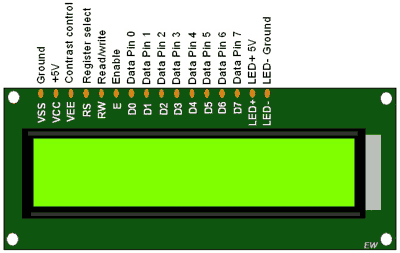
- LCDs (Liquid Crystal Displays) are used in embedded system applications for displaying various parameters and status of the system.
- LCD 16x2 is a 16-pin device that has 2 rows that can accommodate 16 characters each.
- LCD 16x2 can be used in 4-bit mode or 8-bit mode.
- It is also possible to create custom characters.
- It has 8 data lines and 3 control lines that can be used for control purposes.
For more information about LCD 16x2 and how to use it, refer the topic LCD 16x2 module in the sensors and modules section.
Connection Diagram of LCD16x2 with ARM MBED (LPC1768)
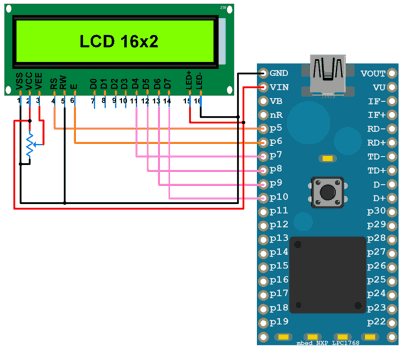
Print Hello World on LCD16x2 using LPC1768 ARM MBED
Displaying text “Hello World!\n” on 16x2 LCD in 4-bit mode.
Here, we are using the TextLCD library, developed by Simon Ford for controlling various LCD panels based on the HD44780 4-bit interface.
You can find more information about the TextLCD library from here.
LCD16x2 Code for LPC1768 ARM MBED
#include "mbed.h"
#include "TextLCD.h"

TextLCD lcd(p5, p6, p7, p8, p9, p10);//RS, RW, D4, D5, D6, D7

int main() {
    int a=0;
    lcd.printf("Hello World!\n");

    while(1)
    {
        lcd.locate(0,1);
        lcd.printf("%d",a);
        wait(1);
        a++;
    }
}
Components Used
Powered by
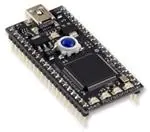
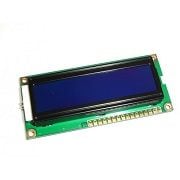
Downloads
Comments1
Join the discussion — share a question or tip.
- RY
Here is some information for anyone powering the MBED through USB. In the "Interfacing Diagram", it shows VCC of the LCD connected to VIN on the MBED board. VIN on the MBED board is an input to a voltage regulator, so it is not meant to be a power output. If you are applying external 5V to this pin, then this will work. But, if you are powering the MBED from USB, then the VU pin should be used to power the LCD. VU is connected directly to the USB 5V power. Thanks to the writer for this very useful information on LCD interface and programming.