Interfacing ADXL335 Accelerometer with ARM MBED LPC1768
Accelerometer ADXL335 sensor measures acceleration of gravity in tilt-sensing or inclination in a smartphone, gaming etc. Here, ADXL335 interfaced with ARM MBED LPC1768 and displayed acceleration data on serial window.
Overview of ADXL335 Accelerometer
An accelerometer is an electromechanical device that will measure acceleration forces. The accelerometer can measure the static acceleration of gravity in tilt-sensing applications as well as dynamic acceleration resulting from motion, shock, or vibration.
ADXL335 is a 3-axis accelerometer that provides analog output for acceleration along the x, y, and z-axis.
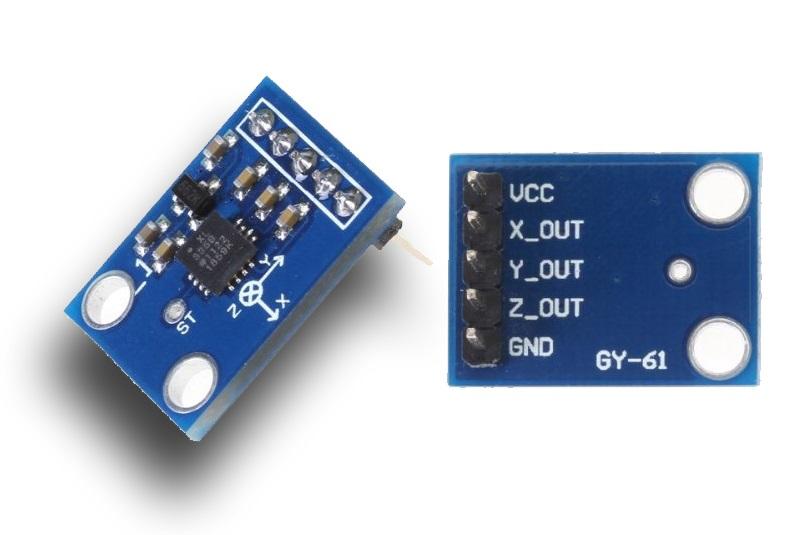
Accelerometer ADXL335 Pin Description
VCC (3.3 V): If in case of ADXL335 Module has on board a 3.3V regulator, then we can connect 5 V to this pin.
GND: Connect Ground to this pin.
X_OUT: This is X-axis analog output from ADXL335.
Y_OUT: This is Y axis analog output from ADXL335.
Z_OUT: This is Z axis analog output from ADXL335.
ST (Self-test): This is self-test pin of ADXL335. Let’s interface the ADXL335 module with ARM MBED.
To know more about how it works refer ADXL335 link in sensors and model.
Connection Diagram of ADXL335 with ARM MBED (LPC1768)
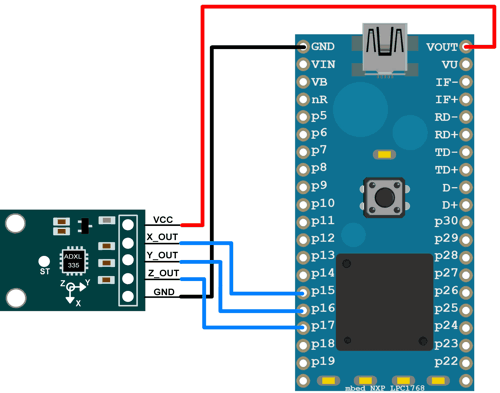
Accelerometer X, Y, and Z pins are connected to Analog input p15, p16, and p17 of ARM MBED respectively.
Example
Let’s interface Accelerometer ADXL335 with ARM MBED LPC1768 board and display this analog value (0-3.3) on the serial window.
Accelerometer ADXL335 code for LPC1768 ARM MBED
#include "mbed.h"
AnalogIn x(p15); //connect x pin of accelerometer to p15 pin of ARM MBED
AnalogIn y(p16); //connect y pin of accelerometer to p16 pin of ARM MBED
AnalogIn z(p17); //connect z pin of accelerometer to p17 pin of ARM MBED
Serial pc(USBTX, USBRX); //tx, rx

int main()
{
	while(1)
	{
		pc.printf("Accelerometer X : %f\n\r", x.read()*3.3);
		pc.printf("Accelerometer Y : %f\n\r", y.read()*3.3);
		pc.printf("Accelerometer Z : %f\n\r", z.read()*3.3);
		pc.printf("\n");
		wait(1); //wait for 1 second
	}
}
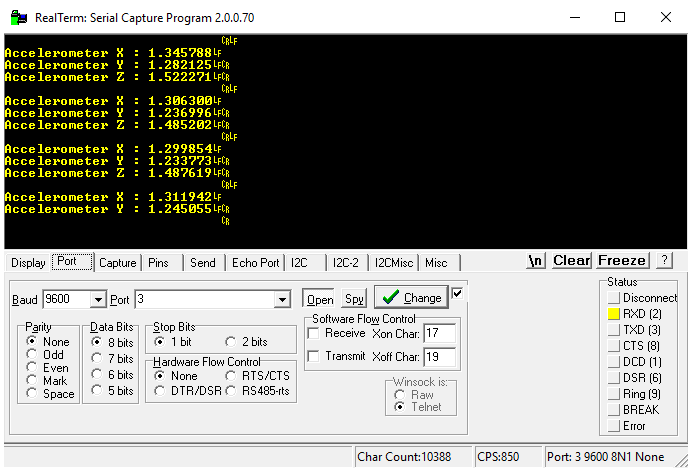
Output Serial Window
Here we can see ADXL335 analog raw value on serial port getting from X, Y, Z pin serially.
Components Used
Powered by
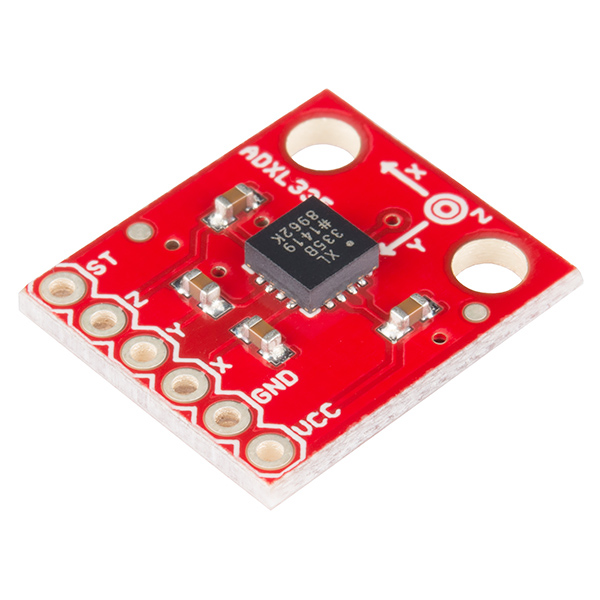
Accelerometer ADXL335 sensor measures acceleration of gravity. It is used to measure the angle of tilt or inclination in application systems such as in mobile devices, gaming applications, laptops, digital cameras, aeroplanes etc.
474-SEN-09269
Downloads
Comments0
Join the discussion — share a question or tip.
Be the first to share your thoughts on this guide.